
Shelf vs Snipe-IT
Snipe-IT Alternative
Compare Snipe-IT and Shelf to understand how each platform approaches asset management, equipment workflows, and organizational visibility.

Snipe-IT Alternative
Snipe-IT is one of the most widely deployed open-source asset management platforms in the world, with over 13,000 GitHub stars and nearly 16 million assets tracked across thousands of organizations. Built in PHP and licensed under AGPL-3.0, it has been the default choice for IT departments that need a free, self-hostable asset registry with deep customization options. Snipe-IT excels at IT-centric record-keeping: serial numbers, purchase orders, depreciation schedules, software license tracking, and LDAP/SAML authentication. Teams exploring alternatives typically need faster day-to-day equipment workflows, simpler onboarding for non-technical users, and modern interfaces that work across all staff levels without administrator involvement.
Overview: Snipe-IT vs Shelf
Snipe-IT approaches asset management as an IT inventory registry. It provides granular data fields, detailed audit logs, software license management, and enterprise authentication integrations. Self-hosting is free, and cloud-hosted plans start at $39.99/month (Basic) up to $249.99/month (Dedicated), with enterprise options reaching $7,500/year. The trade-off is complexity: self-hosted deployments require PHP/MySQL server administration, the interface shows its age compared to modern SaaS tools, and workflows like equipment check-out require administrator-level familiarity.
Shelf approaches asset management as an operational workflow system. Instead of optimizing for the completeness of each asset record, Shelf optimizes for what happens when people interact with equipment: checking it out, booking it, transferring custody, verifying kit completeness, and returning it. Shelf is also open source, so teams get the same self-hosting freedom with a modern, mobile-first interface that non-technical users can adopt without training.
Quick Comparison
| Capability | Snipe-IT | Shelf |
|---|---|---|
| Primary focus | IT asset registry + license management | Equipment check-out, booking, custody |
| Open source | Yes (AGPL-3.0, PHP/Laravel) | Yes (full codebase available) |
| Self-hosted pricing | Free | Free |
| Cloud pricing | From $39.99/month | Managed cloud available |
| Software license tracking | Yes — seats, expiration, keys | No |
| Equipment booking | No native booking system | Built-in with conflict prevention |
| Consumables / quantity tracking | Separate Consumables/Accessories types, one-way only, passive min-amount flag | Per-asset quantity tracking: Used-up or Returnable, units of measure, active min-quantity email + in-app alerts |
| Kit management | Individual asset tracking only | Kit-aware booking and verification |
| LDAP/SAML/SSO | Yes — Active Directory, SAML 2.0 | SSO available |
| Mobile experience | Responsive web UI, no native app | Native iOS & Android app (Shelf Companion) + mobile web |
| Audit trail | Comprehensive activity logging | Full custody chain + activity log |
| Network asset discovery | No — manual entry or CSV import | No — QR-first approach |
| Multi-team workspaces | Single instance with role-based access | Separated workspaces per department |
| Unlimited users | Yes | Yes, on Team |
Where Shelf Takes a Different Approach
1. Operational Workflows vs IT Registry
Snipe-IT is built for IT administrators cataloging hardware inventories. Every asset gets a detailed record with custom fields, depreciation calculations, and warranty tracking. This depth is powerful for maintaining a static registry of what you own.
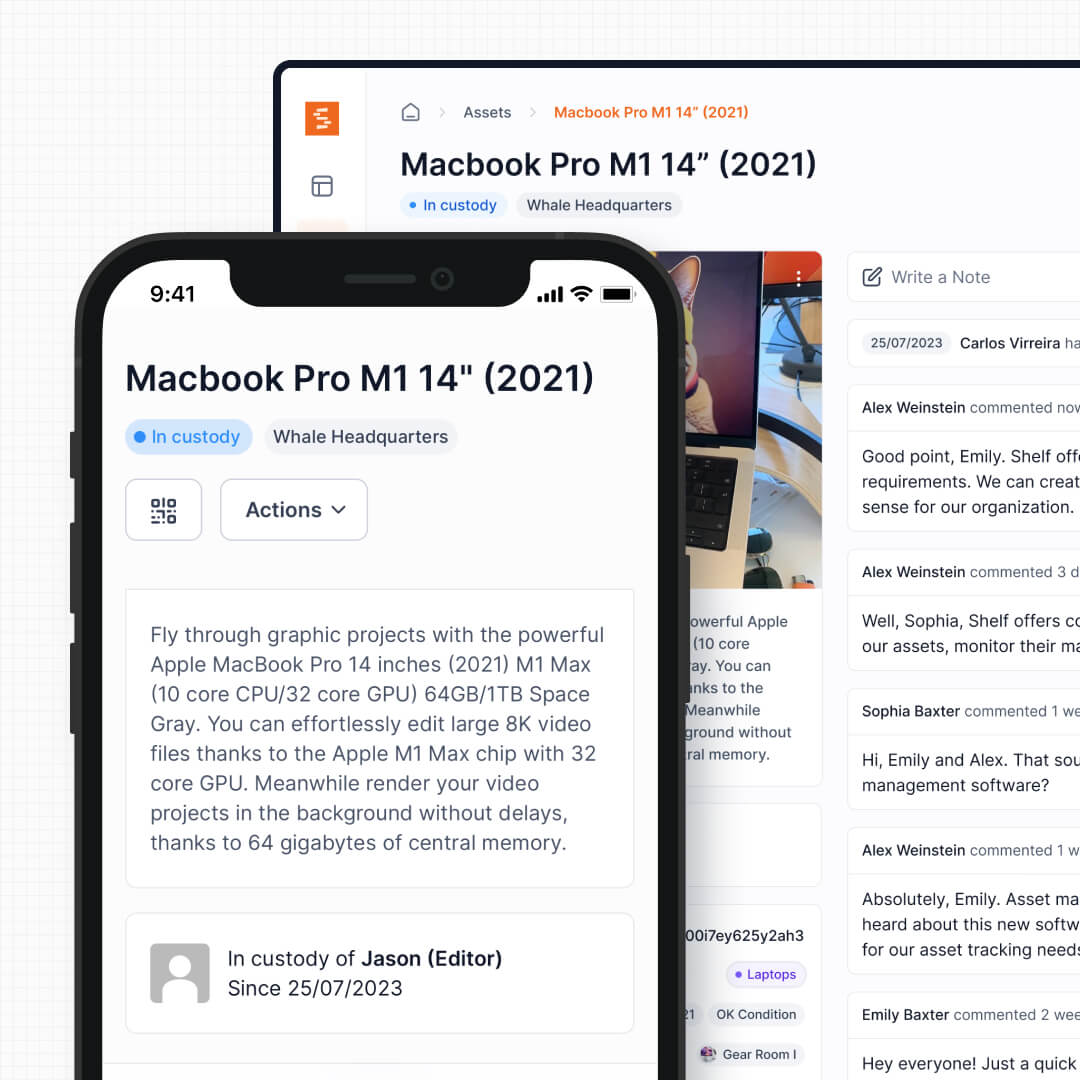
Shelf is built for equipment that moves. When a film crew needs three camera kits for a Monday shoot, when a university lends 50 laptops to students each semester, or when an IT team manages a shared pool of loaner devices, the daily reality is check-outs, returns, and reservations. Shelf's interface is designed around these transactions, not around populating 40 custom fields per asset record.
See: Custody
2. Modern Interface vs Legacy UI
Snipe-IT's interface has remained largely unchanged for years. G2 and Capterra reviewers consistently note that while it is functional, the design feels dated compared to modern SaaS tools. For IT administrators who live in the system daily, this is manageable. For non-technical staff who need to check out a projector once a week, it is a barrier.
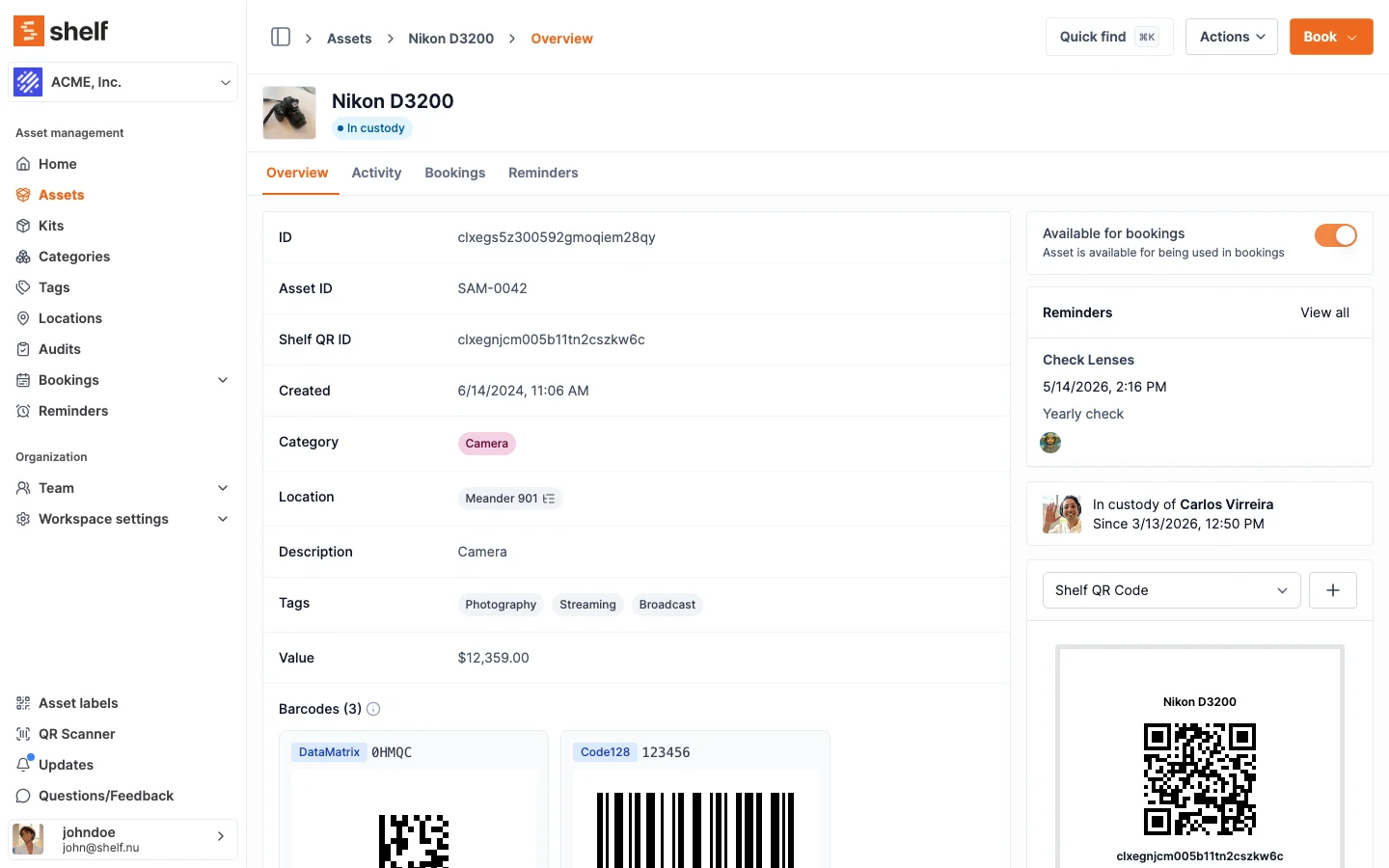
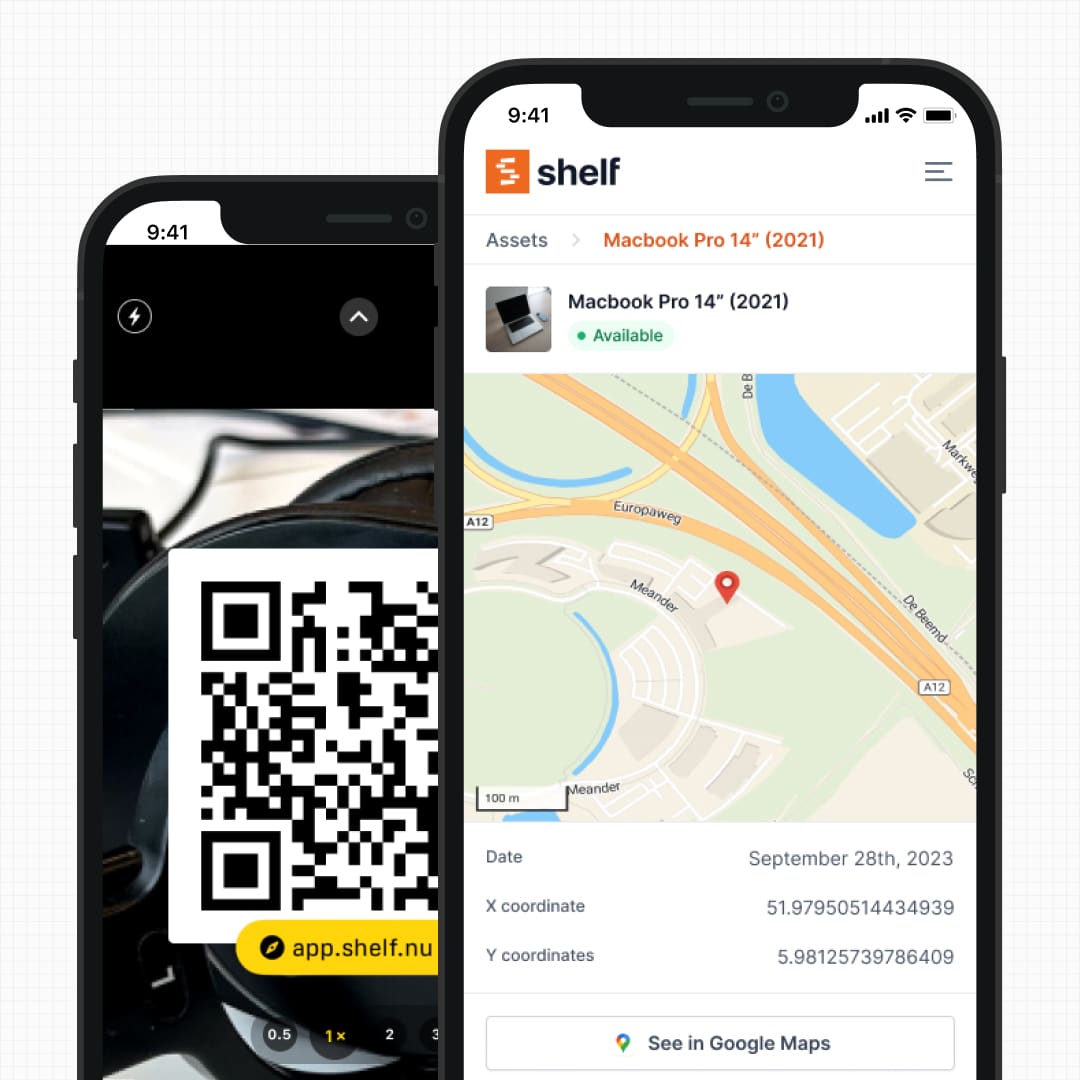
Shelf is designed mobile-first with a contemporary interface. QR scanning, custody transfers, and booking confirmations all work in any modern smartphone browser. For a native experience on iPhone and Android, the free Shelf Companion app is on the App Store and Google Play. Either path, no training session and no administrator hand-holding required.
See: QR Asset Labels
3. Purpose-Built Booking and Reservations
Snipe-IT handles asset assignment: an administrator checks out a device to a user, and checks it back in when returned. There is no native booking or reservation system for scheduling shared equipment in advance.
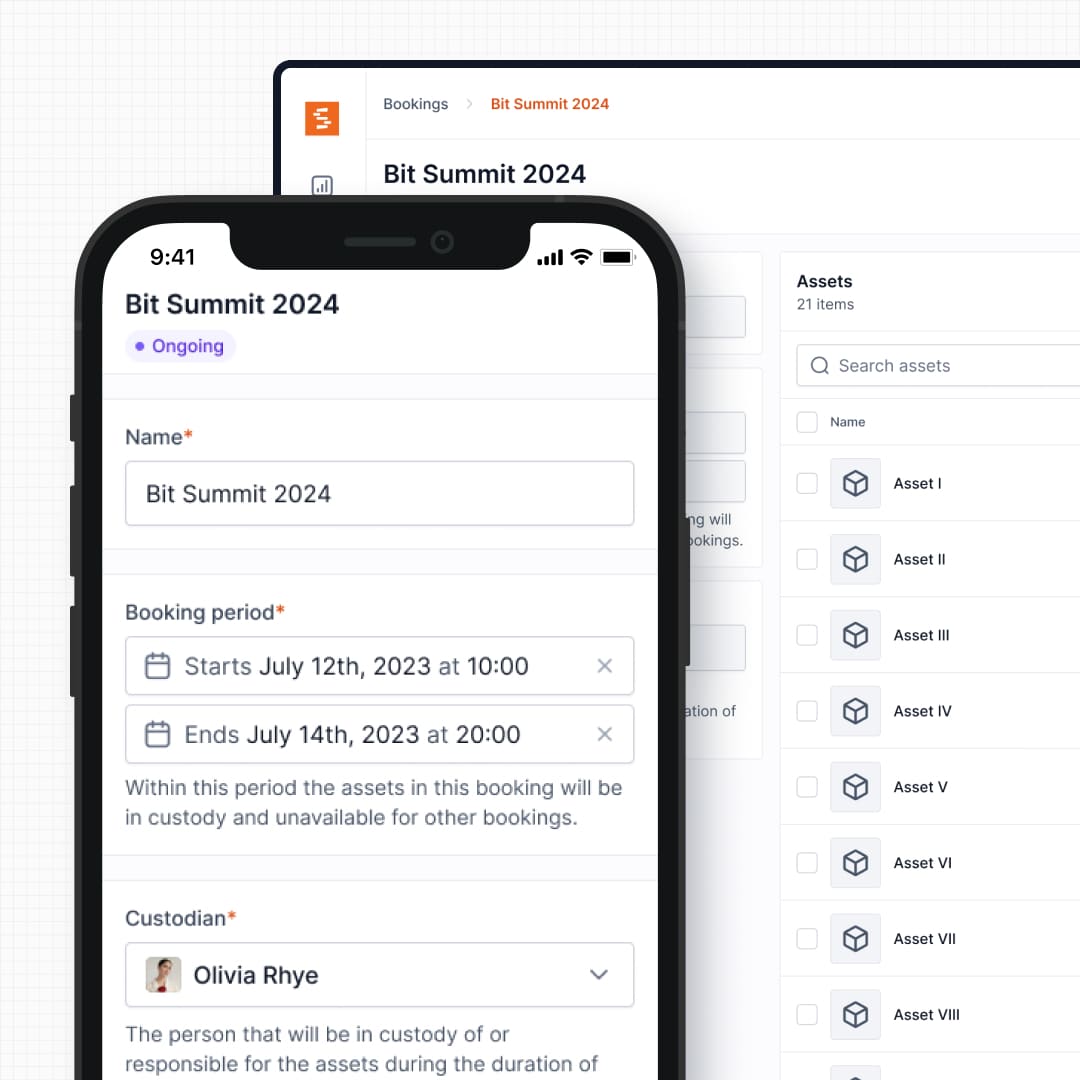
Shelf includes a full booking system with real-time availability calendars, automatic double-booking prevention, and multi-day reservation support. Users can self-serve their own reservations without needing administrator intervention. This matters for environments where dozens of people share the same equipment pool and need to plan ahead.
See: Bookings
4. Kit Tracking and Component Verification
Snipe-IT tracks every asset as an individual record. A camera body, three lenses, a battery grip, and a tripod are five separate line items with no inherent relationship. When someone checks out a kit, the administrator must manually process each component.
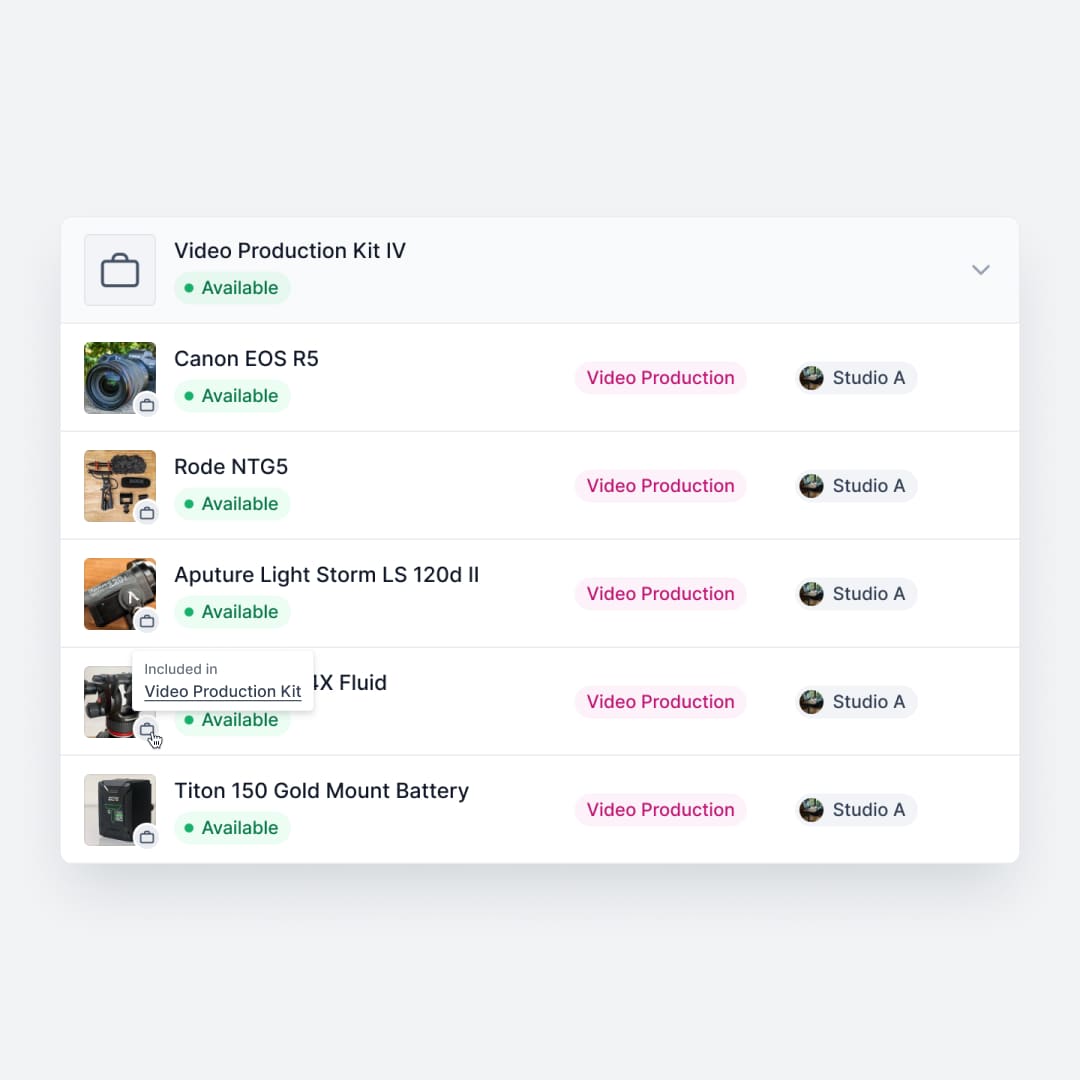
Shelf groups related equipment into kits that are booked, checked out, and verified as a single unit. When a kit comes back, Shelf flags missing components before the next user picks it up. This prevents the slow bleed of accessories that plagues every shared equipment operation, from film schools to field service teams.
See: Kits
5. Unified Consumables Model vs Separate Entity Types
Snipe-IT models consumables as their own thing. Consumables, Accessories, and Components are distinct entity types you pick up front, each with a minimum-amount field that surfaces as a passive low-stock flag in the interface, and consumables are strictly one-way — once issued, they cannot be checked back in.
Shelf keeps everything in one unified asset record. When you create an asset you choose its tracking method — individually tracked, or tracked by quantity for a pool of identical units. Quantity-tracked items get a unit of measure, a min-quantity threshold, and a per-item consumption type: "Used up" for items that are consumed, or "Returnable" for items returned with a consumption report at check-in. You decide that choice per item rather than committing the whole record to a one-way entity type. And the low-stock signal is active, not just visual: when available reaches or falls below the threshold, Shelf emails the workspace owner and every admin, and posts an in-app notification to whoever made the change. Quantity-tracked stock can also be reserved in bookings and included in kits — capabilities Snipe-IT's registry model does not offer.
See: Consumables Tracking
6. QR-First Operations Without Server Complexity
Self-hosting Snipe-IT requires setting up a PHP/MySQL stack, configuring web servers, managing database backups, and handling updates. Reviewers consistently note that the initial setup is demanding for teams without dedicated sysadmin resources. Cloud hosting removes this burden but starts at $39.99/month.
Shelf uses QR codes as the primary interface for equipment operations. Print labels for pennies, scan with any smartphone, and every interaction is logged. Teams can self-host or use managed cloud, but either way the operational interface requires zero server knowledge from end users.
See: Location Tracking
7. Multi-Team Workspaces
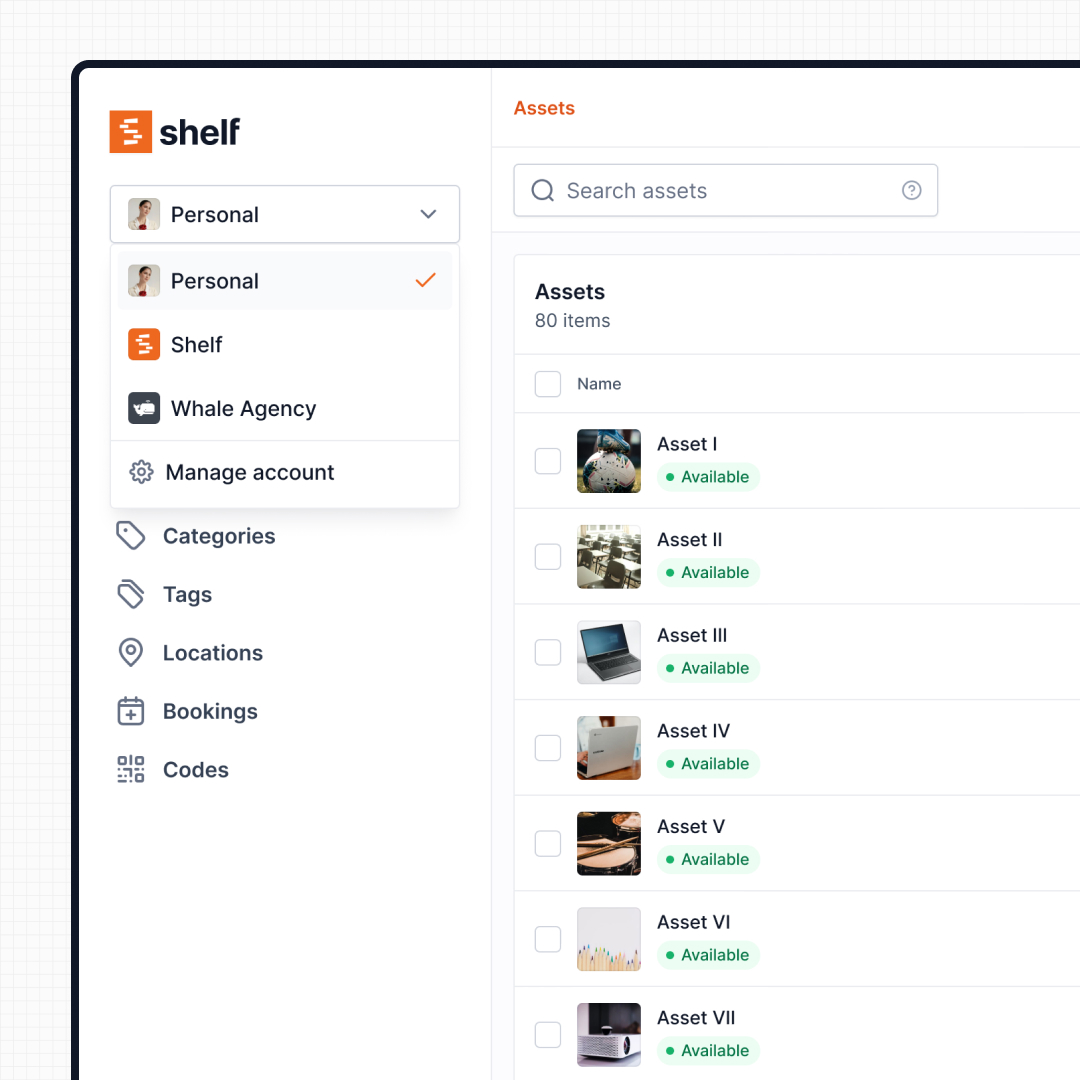
Snipe-IT operates as a single inventory instance with role-based permissions. This works for a single IT department managing one equipment pool. When multiple departments need to manage their own equipment independently, administrators must carefully configure permissions to prevent cross-department clutter and accidental changes.
Shelf uses workspaces to separate inventories by department, program, or location. IT, media production, facilities, and education teams each manage their own equipment independently, with organization-level visibility for administrators. No permission complexity, no cross-department confusion.
See: Workspaces
8. Reporting and Analytics
Snipe-IT includes basic reporting: asset lists, audit logs, activity histories, and depreciation reports. Reviewers on G2 and Capterra consistently cite limited reporting and analytics as a weakness, noting the absence of customizable dashboards and advanced analysis tools.
Shelf includes a built-in Reports area with ready-to-run reports across bookings, assets, and custody — Booking Compliance (on-time vs late returns), Top Booked Assets, Top Booked Kits, Monthly Booking Trends, Overdue Items, Asset Inventory, Asset Activity Summary, Asset Utilization, Idle Assets, Asset Distribution, and Custody Snapshot. Each report supports a timeframe picker, filters by category, location, and custodian, and exports to CSV (with PDF export available for chart-based reports). The reports answer the operational questions IT teams actually get asked — what is overdue right now, which assets are going unused, who has what — rather than only documenting what was purchased.
When Teams Choose Shelf Instead of Snipe-IT
Teams often choose Shelf over Snipe-IT when their daily operations center on equipment circulation rather than IT inventory cataloging:
- Equipment is shared frequently: Daily check-outs, returns, and reservations need a booking-first platform, not a registry-first one
- Non-technical users need to participate: Students, freelancers, and field staff can scan a QR code without training; Snipe-IT's admin-oriented interface requires more onboarding
- Kits need to stay complete: Production, education, and field teams managing grouped equipment need kit-level workflows that track components together
- Multiple departments share one platform: Workspaces let IT, facilities, and media teams operate independently without stepping on each other
- Setup speed matters: Teams that need to be operational in hours rather than days of server configuration
- Modern UX is a requirement: Staff adoption depends on an interface that feels intuitive on mobile devices, not just functional on desktop browsers
- Open source with modern architecture: Teams want codebase transparency and self-hosting without maintaining a PHP/MySQL stack
When Snipe-IT May Be a Better Fit
Snipe-IT is a respected, mature tool with genuine strengths that matter for certain use cases:
- Deep IT asset registries: Organizations that need granular hardware records with 50+ custom fields, depreciation schedules, purchase order tracking, and warranty management will find Snipe-IT's data model more comprehensive
- Software license management: If tracking license seats, expiration dates, product keys, and software assignments is a primary concern, Snipe-IT handles this natively where Shelf does not
- LDAP/Active Directory integration: Enterprises deeply embedded in Active Directory environments benefit from Snipe-IT's mature LDAP sync and SAML 2.0 integration for automated user provisioning
- Established PHP/Laravel expertise: Organizations with existing PHP infrastructure and sysadmin resources can customize and extend Snipe-IT's codebase to fit highly specific IT workflows
- Static asset inventories: When equipment is primarily cataloged and assigned to individuals long-term rather than frequently shared, checked out, and returned, a registry model is the right fit
- Budget constraints with in-house IT: The free self-hosted version with an in-house team that can manage PHP/MySQL infrastructure remains one of the most cost-effective options available
Both platforms are open source and both serve asset management, but they solve different problems within it. Snipe-IT is strongest as an IT asset registry with deep data fields and enterprise authentication. Shelf is strongest when equipment circulates between people and the daily reality is check-outs, bookings, and custody transfers.
If your team spends more time tracking who has the gear than cataloging what the gear is, Shelf is likely the better fit.
Case Studies
See how teams operate with QR-first equipment workflows:
- ResQ Contact Center — 4,000+ Devices Across Multiple Sites
- HAARP — Research Equipment Accountability
- CES Utility Solutions — $70K Equipment Recovery
- Eastern Michigan University — Theatre Equipment Management
Related Solutions
Quick comparison
| Feature | Shelf | Snipe-IT |
|---|---|---|
| Free plan with unlimited assets | Varies | |
| Open source & self-hostable | ||
| QR codes with custom branded labels | Varies | |
| Custody tracking with full audit trail | Varies | |
| Equipment bookings & reservations | Varies | |
| Kit-aware check-in/check-out | Varies | |
| Location hierarchy (up to 12 levels) | Varies | |
| CSV import from any tool | Varies | |
| Works on any device (PWA) | Varies | |
| No credit card to start | Varies |
Feature availability for Snipe-IT may vary by plan. We encourage you to verify on their website.
Compatibility Checker
Will your Snipe-IT Barcodes
Work with Shelf?
Camera preview
Supported barcode types: Code128, Code39, QR Code, DataMatrix, EAN-13, EAN-8, UPC-A, UPC-E, ITF, Code93.
If your barcode doesn't scan, it may be due to camera focus, lighting, or barcode quality. This doesn't necessarily mean your code isn't supported — try again or upload a clearer image.

Ready to switch from Snipe-IT?
Create a free account and import your data in minutes. No credit card required.
Also compare
Evaluating alternatives? See how Shelf stacks up against similar tools.




Ready to organize your assets?
Join thousands of teams who trust Shelf to manage their physical assets. Free forever, or try the Team plan free for 7 days.
Out in the field? Shelf Companion is free on iPhone & Android.