

Reports
Self-serve reports for booking compliance, asset utilization, custody, idle inventory, and more — with charts, CSV export, and PDF download.
Trusted by innovative teams


































































Reports
Reports turn the day-to-day data Shelf already collects — bookings, custody changes, asset activity — into answers. Pick a report, set a timeframe, optionally filter by category or location, and read the result. No SQL, no spreadsheet exports to wrangle, no separate BI tool.
What You Can Report On
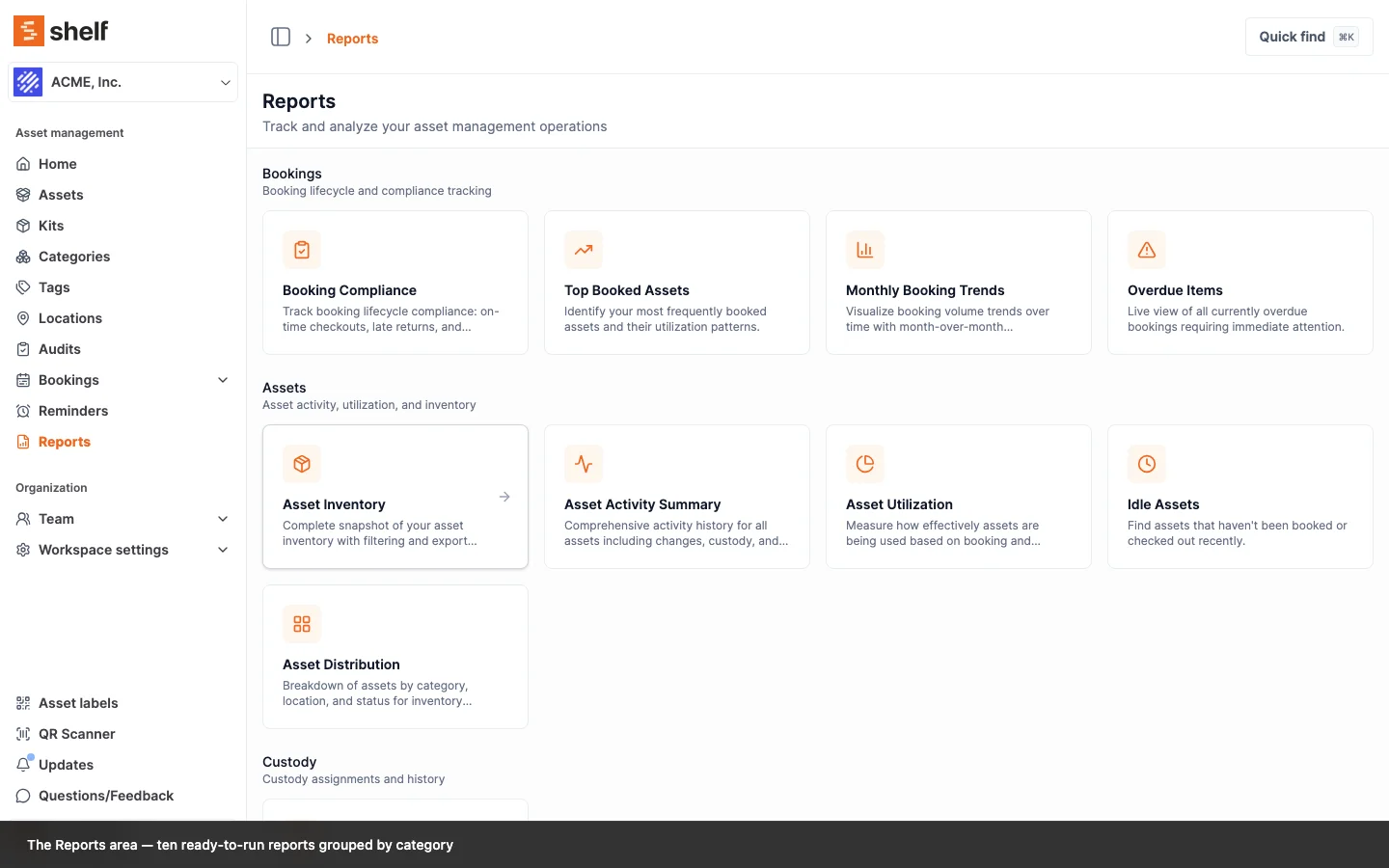
Reports cover the parts of the workflow operations managers are usually asked about: who is overdue, what gets booked, what sits idle, and how things are distributed across the inventory.
Booking Reports
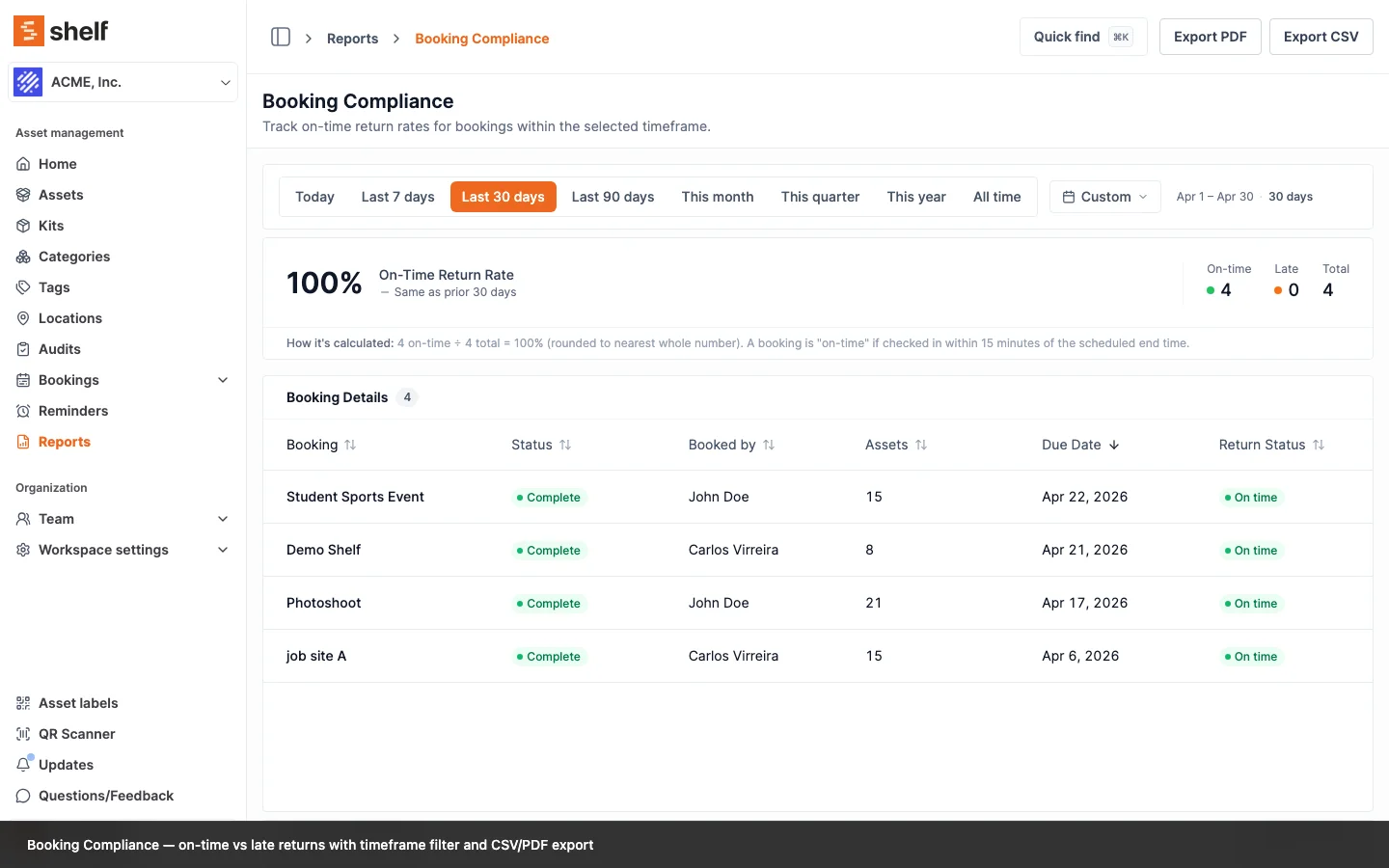
- Booking Compliance — On-time returns, late returns, and overdue items across the timeframe you pick. Lateness is measured against the deadline the booking was agreed to, so extending a booking does not clear a late return from the record. Filter by status, custodian, or location.
- Top Booked Assets — The most frequently booked assets and their utilization patterns. Useful for capacity planning and replacement decisions.
- Top Booked Kits — The most frequently booked kits, ranked by how often each kit goes out. A kit is counted once per booking it appears in, so multiple assets from the same kit in one booking collapse to a single kit-booking. Useful when you bundle and lend equipment as kits and want to plan kit-level capacity.
- Monthly Booking Trends — Booking volume over time with month-over-month comparisons.
- Overdue Items — A live view of every booking that is currently past its end date. Filter by custodian or location to chase down what is missing right now.
Asset Reports
- Asset Inventory — A complete snapshot of the inventory with category, location, and status filters. The fastest way to produce a list for an insurance audit or board report.
- Asset Activity Summary — Activity history across all assets — changes, custody handovers, and bookings.
- Asset Utilization — How effectively each asset is being used, based on booking and custody time.
- Idle Assets — Assets that have not been booked or checked out recently. Surfaces equipment that may be candidates for redistribution or retirement.
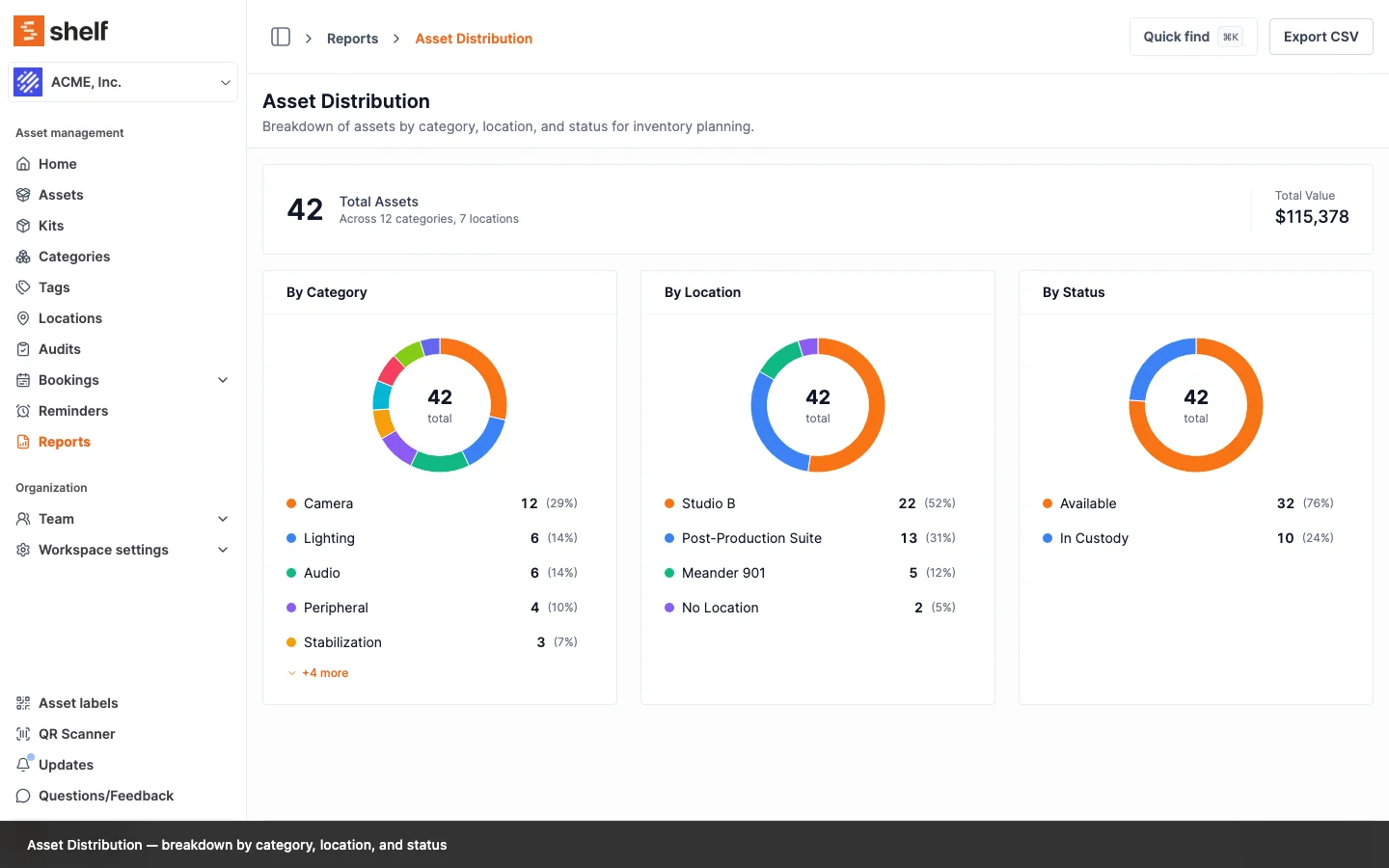
- Asset Distribution — Breakdown by category, location, and status for inventory planning.
Custody Reports
- Custody Snapshot — A live view of every asset currently in custody and the team member it is assigned to.
How Reports Work
Pick a Report
The reports index lists every report grouped by category — bookings, assets, custody. Each card describes what the report shows; click in to run it.
Set the Timeframe
Time-based reports include a timeframe picker with presets for the last 7 / 30 / 90 days, this or last month, this quarter, this year, all time, or a custom range. Snapshot reports (Asset Inventory, Custody Snapshot, Overdue Items) reflect the current state of the workspace and do not need a timeframe.
Filter to the Slice You Care About
Each report exposes filters that match how the underlying data is organized. Booking Compliance filters by status, custodian, and location. Top Booked Assets and Top Booked Kits filter by category and location. The filters are saved in the URL, so you can bookmark or share a specific report view.
Read the Numbers
Reports combine KPI cards for headline numbers, charts for trends and distributions, and tables for the underlying records. Compliance and utilization reports use color to flag entries that need attention.
Values That Add Up
Shelf holds one value per unit, and every money figure in a report multiplies it by the quantity that figure is about: the units booked for value at risk, the units placed at a location for a location bucket, the units a custodian holds for a custody total. An asset split across two sites is counted at each one for the units it actually has there, not twice at full value, so Asset Distribution breaks the same total down three ways — by category, by location and by status — and each breakdown adds back up to the headline.
No Location is the bucket for assets with no placement recorded anywhere, and it carries their full value. Stock that is partly placed is the one deliberate exception: an asset with six units at a location and four not yet put anywhere contributes only the six, and the remaining four are not folded into No Location. That bucket has to describe exactly the assets you get when you click it, which is the assets with no placement at all. So on a workspace that keeps partly-placed stock, the location breakdown can total less than the headline — by design, and only there. Category and status always account for every unit.
For teams tracking cabling, batteries, sandbags or any pooled supply, that is the difference between a report you can hand to finance and one you have to rebuild in a spreadsheet first.
Export the Result
Every report can be exported to CSV for further analysis in a spreadsheet or BI tool. Chart-based reports can additionally be downloaded as a PDF that captures the rendered visualization alongside the data — handy for board packs and customer reviews. Reports without a chart (Asset Inventory, Custody Snapshot, Overdue Items, Idle Assets, Top Booked Kits) export to CSV.
The Asset Inventory and Custody Snapshot exports carry the arithmetic rather than only the result: quantity, unit value and total value as separate columns, in the CSV and totalled the same way in the PDF.
Why It Matters
Stop Reconstructing Data Manually
Before reports, answering "how many bookings were returned late last quarter?" meant exporting bookings to CSV and writing formulas. Now it is a report you can run in seconds and export with one click.
Catch Problems Before They Compound
The Overdue Items and Booking Compliance reports surface the small leaks — late returns, ignored bookings, custody assignments that drag on — that turn into lost equipment.
Justify Inventory Decisions
The Idle Assets and Asset Utilization reports show what is actually being used and what is not. Use them to defend equipment budgets, redistribute under-used assets between teams, or retire what nobody is booking anymore.
Reduce Custodian Disputes
The Custody Snapshot report makes it impossible to argue about who has what — every asset currently in custody is listed with the assigned team member.
Benefits
- Self-serve — Operations managers run reports themselves, without waiting on engineering or exporting to BI tools. Reports are an Administrator and Owner surface, included on every plan
- Filterable — Every report supports filters that match how teams already organize their inventory
- Shareable — URLs encode the filters, so a saved view can be sent to a colleague or bookmarked
- Exportable — CSV for analysis, PDF for distribution
- Live where it matters — Snapshot reports (Custody, Overdue, Inventory) always reflect current state
Related
- Dashboard — for the always-on operational view
- Bookings — booking compliance reports build on the booking data captured here
- Custody — custody snapshot reports build on the custody data captured here
- Audits — audits provide a separate path to verify inventory against reality
Get started with Shelf and turn your equipment data into answers.
Ready to organize your assets?
Join thousands of teams who trust Shelf to manage their physical assets. Free forever, or try the Team plan free for 7 days.
Out in the field? Shelf Companion is free on iPhone & Android.