

Maintenance Tracking
Set reminders for service, inspection, and calibration dates, track service history, and get team notifications when equipment is due — without the complexity of a full CMMS.
Trusted by innovative teams






























































Equipment Maintenance Tracking
Maintenance tracking is the process of scheduling, documenting, and monitoring equipment servicing — calibration dates, safety inspections, preventive maintenance intervals, and repair history. Without a system, maintenance gets skipped, warranties expire unnoticed, and equipment fails at the worst possible moment.
Shelf provides maintenance tracking through Asset Reminders and Custom Fields — date-based reminders, automatic team notifications, and service history attached to every asset. It is not a full CMMS (Computerized Maintenance Management System) with work orders, recurring maintenance schedules, parts inventory, and technician dispatching. It is the maintenance layer that 80% of equipment teams actually need: know what is due, get notified, document what was done.
When You Need Maintenance Tracking (But Not a CMMS)
Full CMMS platforms — UpKeep, Limble, Fiix — are built for facilities and industrial maintenance teams that manage thousands of work orders, parts catalogs, and technician schedules. They are powerful, complex, and expensive.
Most equipment teams do not need that level of complexity. They need answers to simpler questions:
- When is this forklift's next safety inspection?
- Which fire extinguishers expire this month?
- Has this camera been serviced since the lens issue?
- Who was notified about the overdue calibration on the pressure gauge?
- What maintenance has been done on this vehicle in the past year?
If your maintenance needs center on scheduling reminders, logging completed service, and keeping equipment compliant — rather than dispatching technicians and managing spare parts — Shelf handles it without the overhead of a dedicated CMMS.
How Shelf Handles Maintenance Tracking
Asset Reminders — A Heads-Up Before Each Due Date
Asset Reminders let you set a reminder for any maintenance event:
- Preventive maintenance: The next oil change, filter replacement, or annual safety inspection
- Calibration: Lab instruments and testing equipment on manufacturer-specified intervals
- Certifications and inspections: Fire extinguisher checks, electrical safety testing, vehicle inspections
- Warranty expiration: Get notified before coverage lapses so you can renew or plan for replacement
- Lease renewals: Equipment lease end dates with advance notice for budget planning
Each reminder is attached to a specific asset, is set for a specific date, and notifies designated team members by email as the date approaches. Reminders do not repeat on their own: when the work is done, log it and set the next reminder.
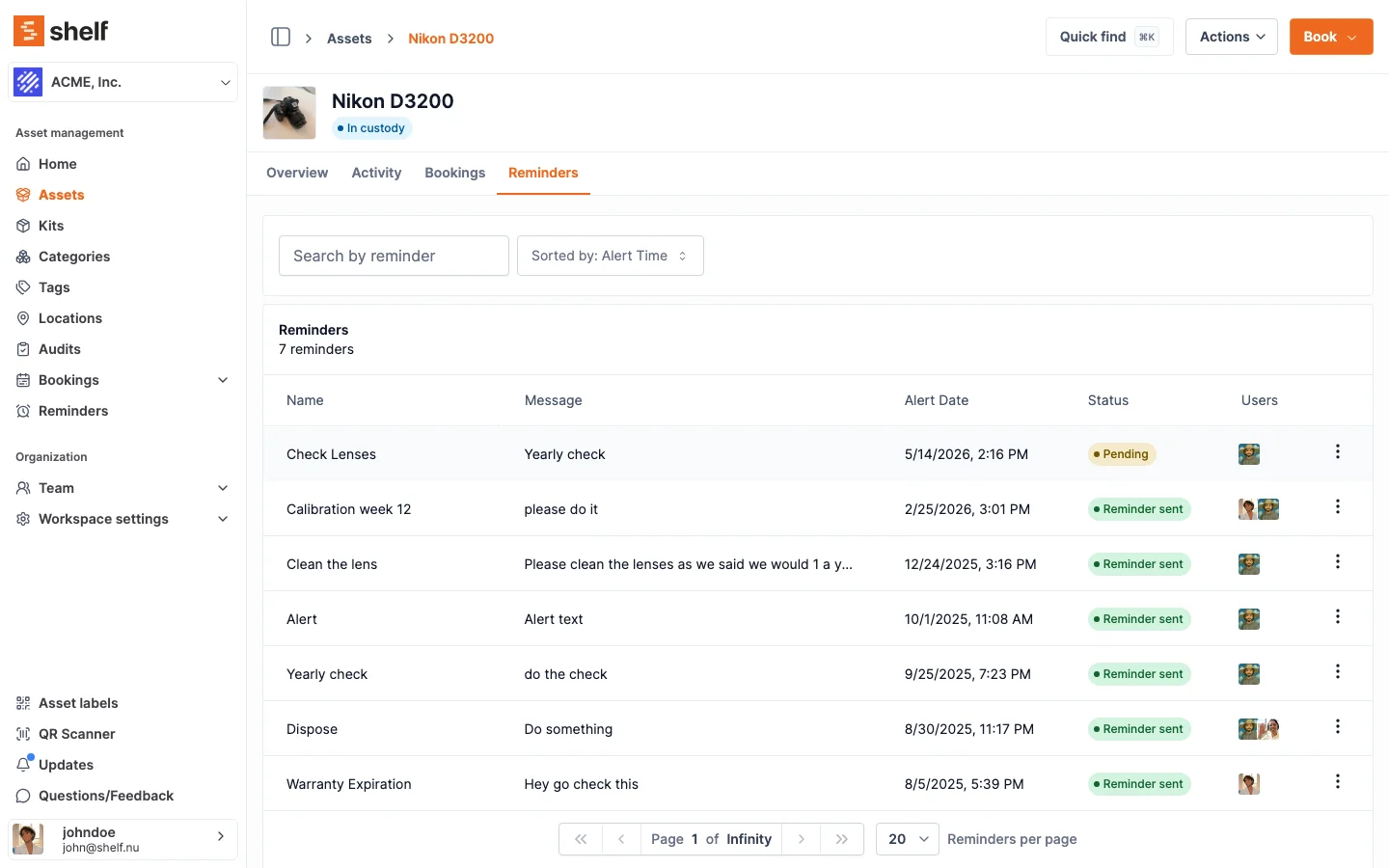
See: Asset Reminders
Custom Fields — Document Service History
Custom Fields turn every asset into a structured maintenance record. Add fields specific to your equipment and maintenance workflows:
- Last Service Date (date field)
- Next Service Due (date field)
- Service Provider (text field)
- Maintenance Cost (number field)
- Service Notes (text field)
- Calibration Certificate Number (text field)
- Hours Since Last Service (number field)
Custom fields are fully searchable and filterable. Need to find all assets where the last service was more than six months ago? Filter the dashboard. Need to export maintenance records for an insurance audit? Export to CSV.
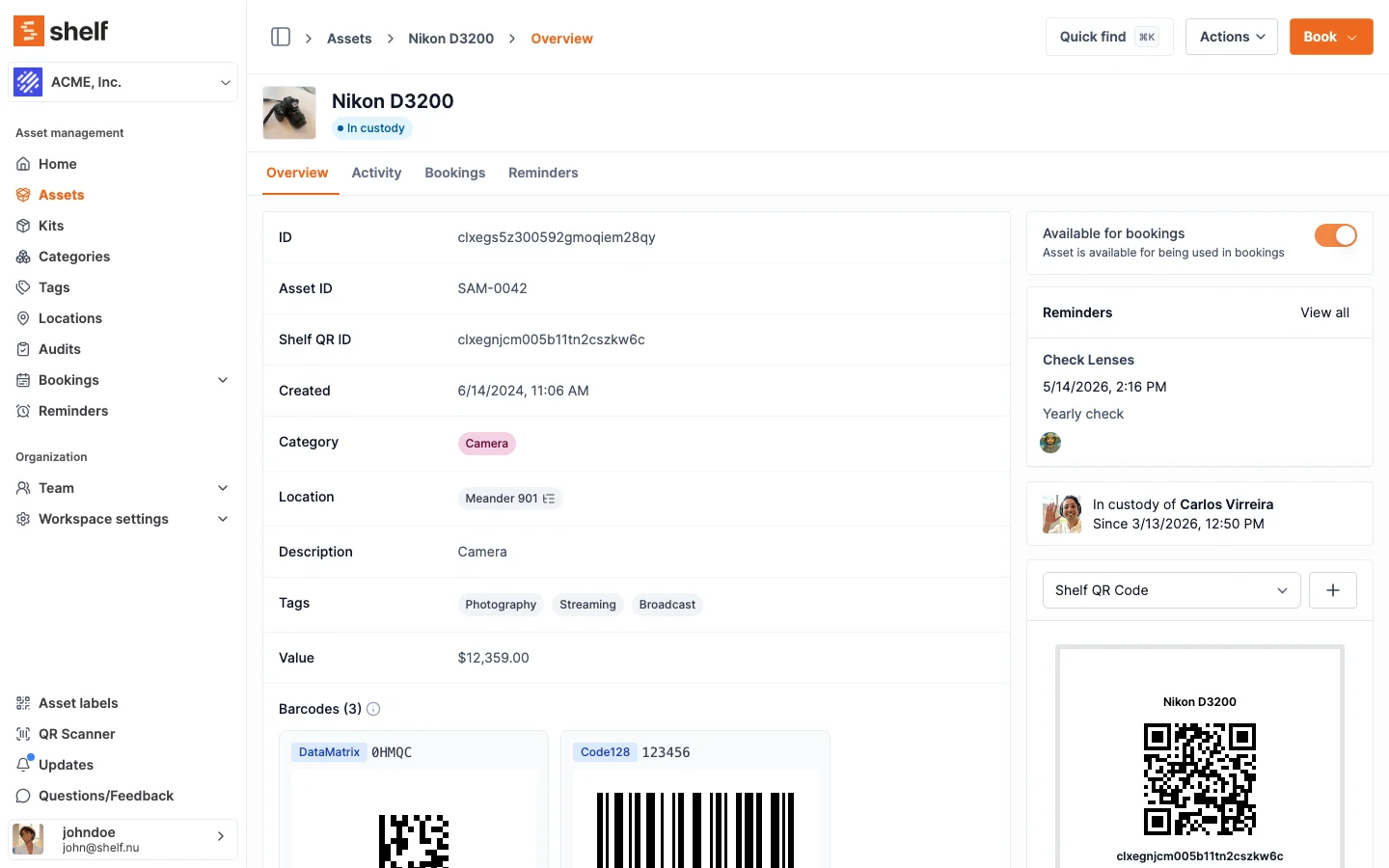
See: Custom Fields
Activity History — Permanent Maintenance Log
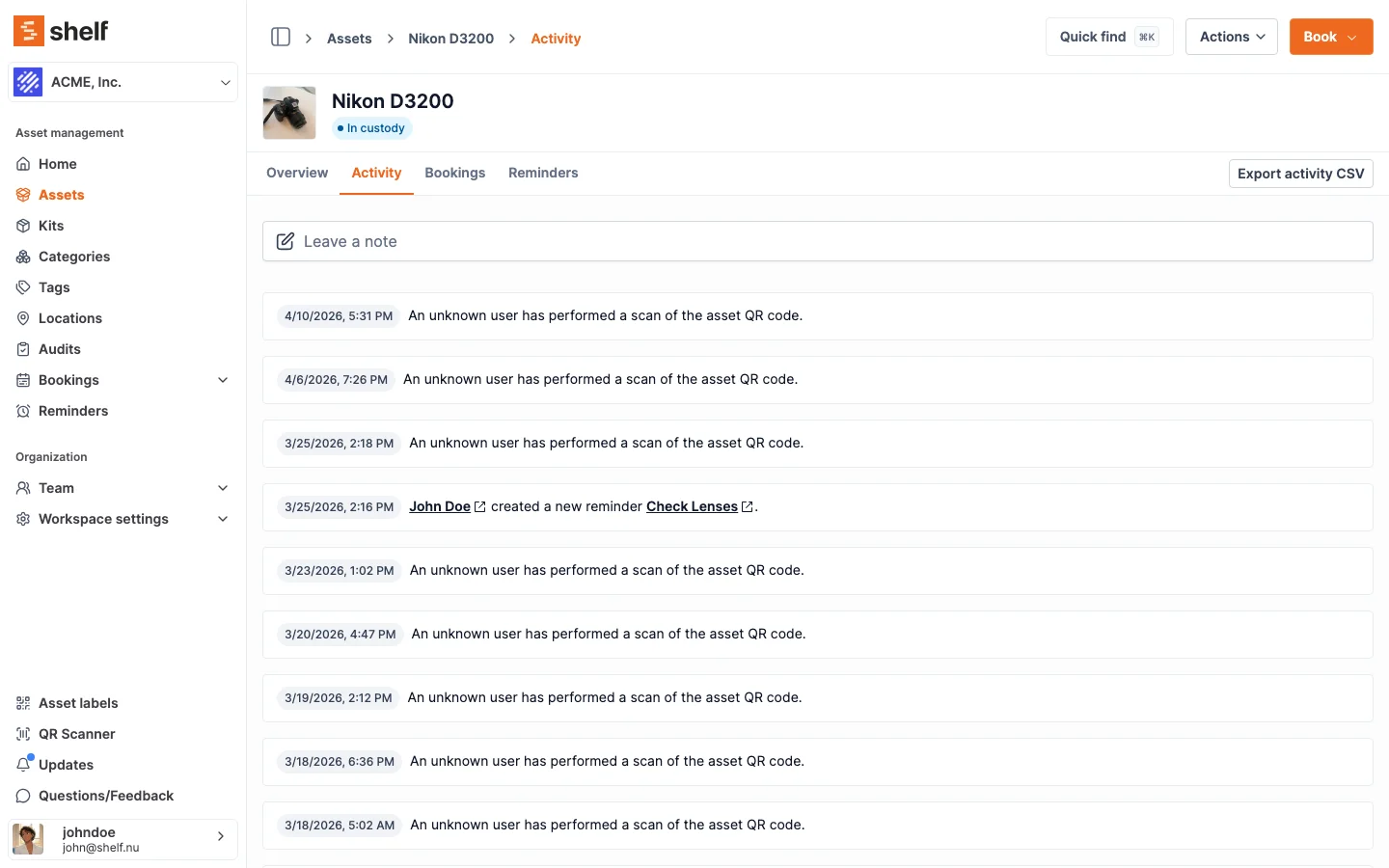
Every action on an asset — check-out, return, location change, field update, reminder triggered — is logged in the asset's activity history with a timestamp and the user who performed it. This creates an automatic maintenance log:
- Reminder fires: "Annual safety inspection due for Forklift #12"
- Technician updates custom fields: Last Service Date → 2026-03-12, Service Notes → "Hydraulic fluid replaced, brakes inspected, passed safety check"
- The update is permanently logged in the asset's activity timeline
No separate maintenance log to maintain. No paperwork to file. The asset itself carries its complete service history.
Calibration Dates — A Register, Not a Metrology System
Keep each instrument's calibration due date in a date custom field, with the certificate number and provider in text fields, and set an Asset Reminder ahead of the due date. Shelf is a register and a reminder, not a calibration or metrology system: it does not store certificate files, record pass/fail results or measurement uncertainty, or schedule recurring calibrations. Teams that perform calibrations themselves should use dedicated calibration software.
Multi-Location Maintenance Visibility
For organizations with equipment across multiple sites, Shelf's location tracking lets you see maintenance status across every facility. Filter by location to see which equipment at a specific warehouse is overdue for service. Or view the entire organization to identify maintenance patterns — maybe one site's equipment consistently needs more frequent repairs, signaling an environmental or usage issue.
See: Multi-Location Asset Tracking
Spare Parts and Consumables — Basic Counts
Maintenance runs on supplies: filters, lubricants, gaskets, fasteners, cleaning materials. Shelf lets you keep a simple count of these by tracking them by quantity — one record per type with a running total, a unit of measure, and a minimum-stock threshold. When the count reaches or falls below that threshold, the workspace owner and every admin get a low-stock email so the part gets reordered before the next service is blocked.
This is a stock count with alerts, not a procurement system. Shelf does not generate purchase orders or link parts consumption to work orders — that is CMMS territory. For most teams, knowing "we're low on filters" in time to reorder is exactly enough.
See: Track consumables by quantity
Key Maintenance Features
- Date-based reminders: Set email notifications ahead of any due date; add the next one after each service
- Email notifications: Designated team members receive alerts when maintenance is approaching or overdue
- Custom fields: Track service dates, costs, providers, certificate numbers, and any maintenance-specific data
- Activity history: Permanent, timestamped log of every maintenance action and field update
- QR scanning: Scan equipment in the field to view its maintenance status, last service date, and upcoming reminders
- Multi-location: See maintenance status across all sites from one dashboard
- CSV export: Pull maintenance records for audits, insurance, or compliance reporting
- Bulk actions: Update maintenance fields on multiple assets simultaneously
- No asset limits: Track maintenance for unlimited equipment on every plan
Common Use Cases
- Construction and trades: Track safety inspections, tool calibrations, and vehicle maintenance intervals for field equipment. Reminders ensure nothing slips through the cracks between job sites.
- Manufacturing and warehousing: Set reminders for the next preventive maintenance on forklifts, conveyor systems, and production equipment. Log service history with custom fields for audit compliance.
- IT departments: Track warranty expiration dates, lease renewal deadlines, and refresh cycles for laptops, servers, and networking equipment. Know when hardware is approaching end-of-life before it fails.
- Research and laboratories: Keep calibration due dates for instruments and testing equipment, with a reminder before each one. Document certification numbers and service provider details for regulatory compliance.
- Facilities management: Monitor HVAC servicing, fire extinguisher inspections, elevator certifications, and building equipment maintenance across multiple buildings.
- Agriculture and land management: Track maintenance intervals for vehicles, irrigation equipment, and field tools across large properties.
Shelf vs. Full CMMS — Choosing the Right Fit
| Need | Shelf | Full CMMS |
|---|---|---|
| Date-based reminders | Yes — set per asset, per due date | Yes |
| Recurring maintenance schedules | No — set the next reminder after each service | Yes |
| Service history log | Yes — via custom fields + activity history | Yes — dedicated work orders |
| Team notifications | Yes — email alerts to assigned members | Yes — plus technician dispatch |
| Work order management | No | Yes |
| Spare-parts stock counts | Basic — count by quantity with low-stock email | Yes — full parts catalog + purchase orders |
| Technician scheduling | No | Yes |
| Equipment check-out/booking | Yes — built-in | Rarely included |
| QR-based field operations | Yes | Varies |
| Asset custody tracking | Yes — full chain | No |
| Pricing | Free plan; Team at flat rate | $45–150+/user/month |
| Setup time | Minutes | Weeks to months |
| Open source | Yes | Rarely |
Choose Shelf if your team needs maintenance reminders and service logging alongside equipment tracking, check-out, and booking. One system for everything.
Choose a full CMMS if you need dedicated work order workflows, parts inventory management, and technician dispatching as your primary use case.
Many teams start with Shelf for maintenance tracking and only move to a CMMS if their maintenance operations grow to require it. Most never do.
Why Teams Choose Shelf for Maintenance Tracking
- No CMMS overhead: Get 80% of the maintenance value without the complexity, cost, or implementation timeline
- Combined system: Maintenance tracking, check-out, booking, and custody in one platform — not three separate tools
- Free to start: Unlimited assets and reminders on the free plan. No credit card required.
- Flat-rate pricing: The Team plan covers unlimited users — no per-seat maintenance tax
- Open source: AGPL licensed. Self-host or use the managed cloud.
- Set up in minutes: Import assets, add reminders for upcoming due dates, start tracking. No consultant required.
Getting Started
- Sign up for free at app.shelf.nu — no credit card required.
- Add your equipment manually or import from a CSV file.
- Create custom fields for maintenance data — service dates, costs, providers, notes.
- Set up asset reminders — add reminders ahead of inspection, calibration, and preventive-maintenance due dates.
- Assign team members to receive notifications when maintenance is due.
- Print QR labels so field technicians can scan equipment to view maintenance status on-site.
Frequently Asked Questions
Does Shelf replace a CMMS?
For most equipment teams, yes. If your maintenance needs are date reminders, logging service history, and keeping equipment compliant, Shelf covers it. If you need dedicated work order workflows, recurring maintenance schedules, parts catalog management, and technician dispatching, a full CMMS is a better fit.
Can I set different maintenance dates for different equipment?
Yes. Each asset gets its own reminders, set individually. Add a reminder for the forklift's next safety check and another for the fire extinguisher's next inspection — each on its own date.
How do I log completed maintenance?
Update the asset's custom fields (Last Service Date, Service Notes, etc.) — the change is automatically logged in the activity history with a timestamp and the user who made the update. This creates a permanent maintenance record.
Can I export maintenance records for audits?
Yes. Export assets with all custom field data to CSV. Filter by category, location, or date range to pull exactly the records your auditor needs.
Who gets notified when maintenance is due?
You choose. Each reminder can notify specific team members by email. Assign the site manager, the maintenance lead, or the entire operations team — whatever fits your workflow.
Is there a limit on how many reminders I can set?
No. Set as many reminders as your equipment requires — there is no cap on the number of reminders per asset or across your organization.
Related Solutions
Ready to organize your assets?
Join thousands of teams who trust Shelf to manage their physical assets. Free forever, or try the Team plan free for 7 days.
Out in the field? Shelf Companion is free on iPhone & Android.