

Consumables Tracking
Track supplies and consumables by quantity alongside your individually-tracked assets — units of measure, min-quantity low-stock alerts, Used-up or Returnable consumption, and quantity-aware custody, bookings, and kits.
Trusted by innovative teams
































































Consumables Tracking Software
Not everything you manage is a single, serialized asset. Cables, batteries, gloves, printer toner, lab reagents, PPE — these come in bulk, get used up, and need restocking. Shelf lets you track supplies and consumables by quantity alongside your individually-tracked assets, in one system, so your stock of disposables and your fleet of equipment live side by side.
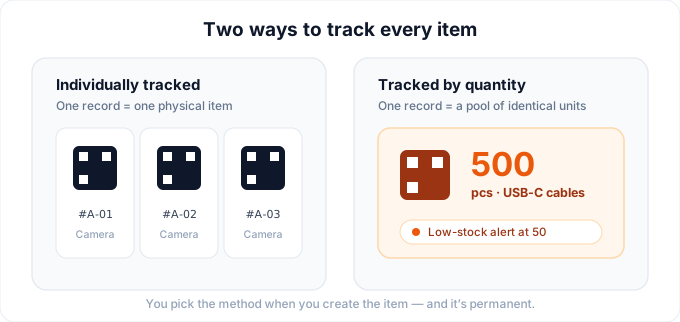
Two ways to track every item
When you create an item in Shelf, you choose how it's tracked:
- Individually tracked (the default): one record is one physical thing, with its own QR label, custody, and history. This is how you track laptops, cameras, power tools — anything serialized and unique.
- Tracked by quantity: one record is a pool of identical, interchangeable units sharing a single QR label. This is how you track consumables by quantity — the printer paper, the AA batteries, the box of nitrile gloves.
The tracking method is chosen at creation and is permanent — it locks once the item exists, so decide up front whether an item is a unique asset or a pool of stock. Quantity tracking complements individual tracking; it doesn't replace it.
Not sure which method fits an item? How to Choose a Tracking Method walks the decision in four questions, including when a fleet of identical units belongs under an Asset Model instead.
Track assets by quantity
A quantity-tracked item holds a total quantity in a unit of measure you define yourself — pieces, boxes, liters, kilograms, whatever fits. The whole pool shares one QR label, so a single scan finds the stock rather than hunting for one unit among hundreds.
Your available quantity is computed live as you go: the total, minus what's in custody, minus what's earmarked to a kit, minus what's checked out on an active booking. It shows what's genuinely on the shelf to hand out right now, without maintaining a separate "available" number by hand. Units reserved for future dates are counted separately, on their own Reserved (bookings) row, so a booking three weeks out never makes today's stock look smaller than it is.
Consumable or returnable
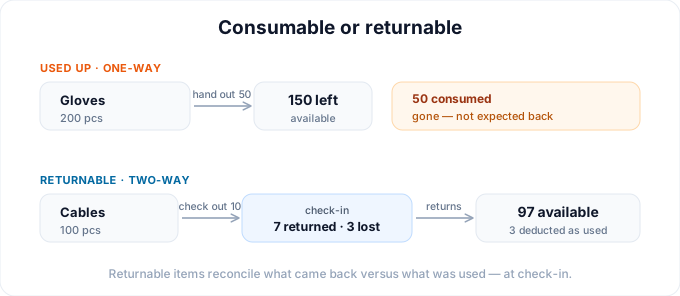
Every quantity-tracked item has a consumption type that matches how it's actually used:
- Used up: a one-way consumable. Once it's issued, it's gone — paper, reagents, disposable gloves. Shelf applies that on both routes stock leaves by, a booking check-in and a custody hand-out, so the count drops either way.
- Returnable: a two-way pool. Units go out and come back, and a consumption report is recorded at check-in so you capture how much was actually used versus returned.
For day-to-day stock changes, quick adjustments keep counts honest: restock to add stock (+), record a loss (−), or correct a miscount — each with an optional note. Every adjustment is logged with full attribution and shows up in the asset's activity notes, so there's a running audit trail of who changed what and why.
Quantity-aware custody
Custody works at the unit level. Assign any portion of a pool to a person and let multiple people each hold a share of the same item at once — each custodian's quantity is tracked separately. Hand 5 of 20 radios to one crew lead and 10 to another, and Shelf knows exactly who's holding what.
Ending a hold follows the item's consumption type, so the stock figure stays honest without anyone remembering a rule. Returnable units go back into the available pool. A used-up consumable is marked as consumed instead, and those units come off the total for good. When only part of a hand-out was actually used, record that: a crew that took 40 pairs of gloves and used 10 hands the other 30 back in the same action. The split is written to the item's activity log, and a consume that crosses the minimum triggers the low-stock alert below.
Low-stock alerts
Set a minimum quantity threshold on any quantity-tracked item and Shelf watches it for you. When a stock adjustment, a custody assignment, or a booking check-in takes available stock to or below that minimum, the workspace owner and every admin get an email alert, and an in-app notification goes to whoever made the change. When stock recovers, the same people get a Back in stock notice, and the Low stock badge on the asset page clears itself.
The alert fires once per crossing, not on every decrement. Shelf remembers that an item is already flagged and stays quiet until it recovers, so drawing a pool down over a week does not produce a week of email.
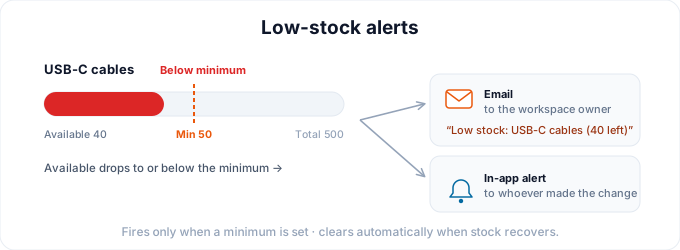
Alerts only fire when a minimum is set, so no threshold means no noise.
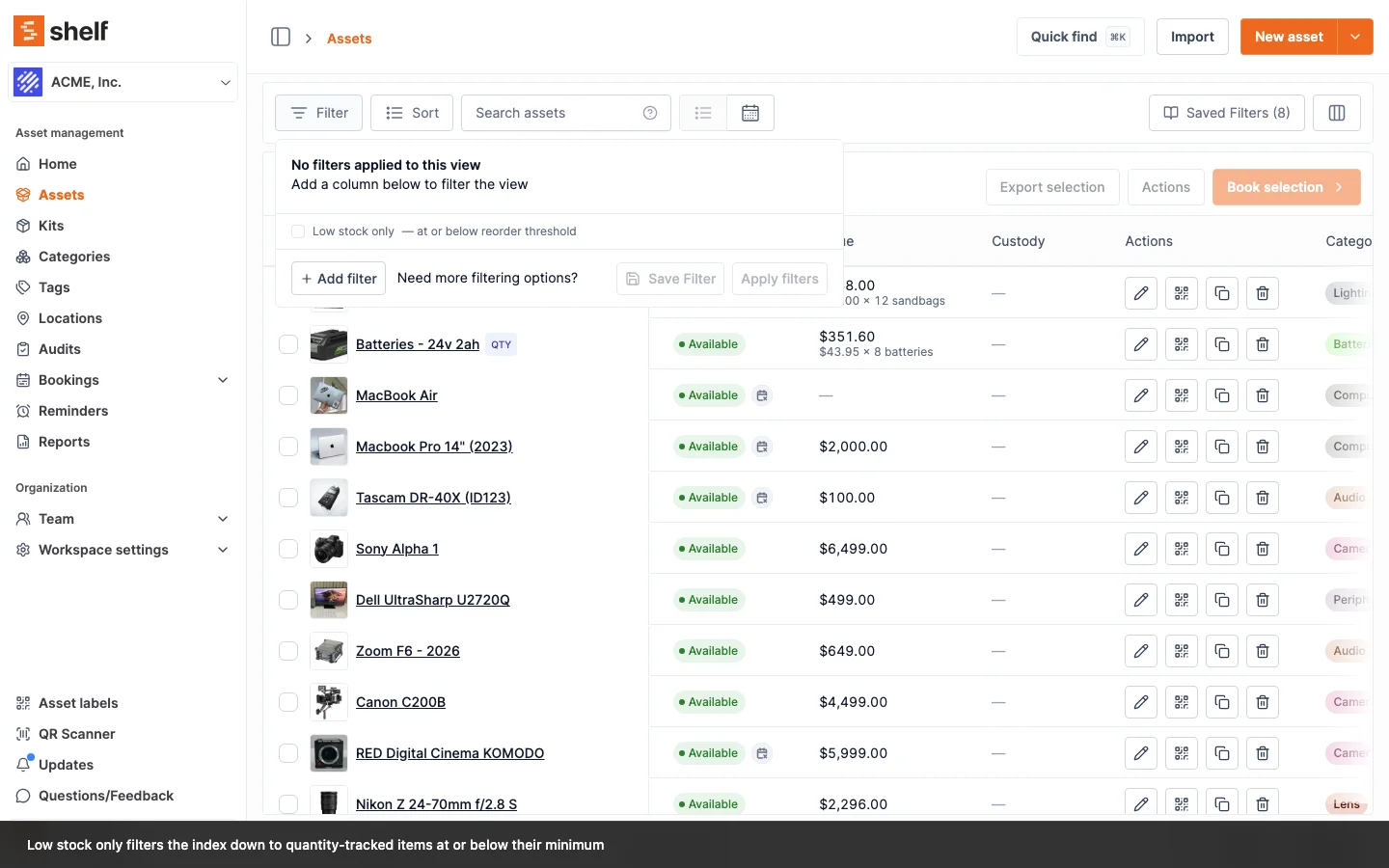
To see everything running low at once, open the advanced asset index, click Filter, and tick Low stock only. Add Min quantity as a column and each item's threshold sits next to its live count.
Every stock change is on the record
Quick adjustments aren't the only thing tracked. Changing a count on the asset edit form, or changing the min quantity threshold itself, writes its own entry to the asset's Activity tab with the old and new value and who made the change, and the decrements a booking check-in or a consumable hand-out applies are logged the same way, with consumed and returned units recorded separately. However stock moved, it left a trail, so "who took 40 cables and when" has an answer without anyone keeping a side spreadsheet.
Quantity in bookings & kits
Quantity-tracked stock plugs into the rest of Shelf:
- Bookings: reserve N units from the pool for a date range, and adjust that number as plans change. Shelf counts what's free on those dates and won't let a booking take units that aren't there. Because the count is date-aware, stock that comes back before a booking starts can be booked by someone else in the meantime, so the same 10 sandbags can serve three crews in three different weeks.
- Kits: include quantity-tracked stock in a kit, and the kit handles custody by quantity — so a kit that ships with 3 cables and 1 charger keeps its stock counts straight.
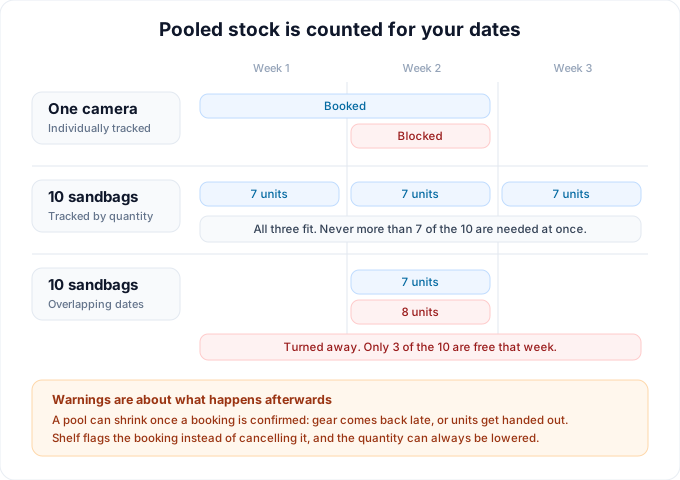
Bookings — and quantity in bookings — are available on Team plans.
Import & export
CSV import/export supports quantity tracking directly, with columns for quantity, unit of measure, min-quantity, and consumption type — so you can bring an existing supply list in (or pull it out) in bulk. Import/export is a premium capability.
Asset models: fleets tracked unit by unit
Asset Models cover the middle ground between one-off assets and pooled stock: fleets of identical, serialized gear where every unit still needs its own record. Group individually tracked units under a model (say, "Dell Latitude 5550") and each unit keeps its own QR label, custody, and history, while new units created from the model inherit shared defaults like category and valuation. A model also carries one cover image: upload the product photo once and every unit that has no photo of its own displays it, across the asset index, reports, PDFs, and the mobile app. Bookings can reserve by model: reserve "4x HDMI cable" and scan any 4 units at pickup (bookings are on Team plans). Models group individually tracked assets only (a quantity-tracked pool cannot join a model), and units can join or leave a model at any time. Models themselves live under Settings → Asset models, and a fleet you already own is grouped from the asset index in one pass: select the units, then Actions → Update asset model.
Available on every plan
Quantity tracking and asset models aren't plan-gated — they're available on every Shelf plan, including the free tier. The features that build on top keep their usual tiers: bookings (including reserving quantity and reserving by model) are on Team plans, and CSV import/export is premium. Shelf is open source and free to start, with the free tier supporting a single user.
Common use cases
- IT supply closet: track cables, adapters, batteries, and toner by count. Set a min-quantity on the essentials so the workspace owner gets an email before you run out.
- Lab and medical supplies: manage reagents, gloves, and consumables in their real units (liters, boxes, pieces), with returnable items reporting actual usage at check-in.
- Job-site consumables and PPE: hand portions of bulk PPE to different crews, track who's holding what, and restock from the field.
- Event materials: reserve N of a printed program or giveaway for a booking, scan-to-assign at checkout, and reconcile what came back.
Related Features
- Custody
- Bookings
- Kits
- Asset Pages
- Learn the full workflow: Quantity-tracked assets & consumables
- Not sure which method fits? How to Choose a Tracking Method
Ready to organize your assets?
Join thousands of teams who trust Shelf to manage their physical assets. Free forever, or try the Team plan free for 7 days.
Out in the field? Shelf Companion is free on iPhone & Android.