

Events
For teams that run events with their own gear: gazebos, tables, freezers, staging and the stock that gets used up. Book gear to each event, print the pick list, scan it out and back in, and count what was consumed.
Equipment Tracking for Teams That Run Their Own Events
Festival organisers, corporate event teams, caterers and venue crews own a warehouse of gear: gazebos with their legs and weights, trestle tables, chairs, freezers, generators, staging, signage. Most of them also hold stock that never comes back whole, like drinks, cups and gas bottles.
The loop is the same every week. Gear leaves the warehouse for an event, spends a weekend on site, and comes back, or doesn't. Shelf tracks that loop: each event is a booking, gear is scanned out at the dock and back in afterwards, and stock that got used up is counted when it returns.
Shelf is for gear your own team uses at your own events. If you rent gear to clients and need quotes, invoices and deposits, it isn't the right tool; more on that below.
Common Challenges for Event Teams
- The same gear promised to two events: two planners each pencil in the big gazebos for the same Saturday, and the clash shows up on the loading dock.
- Pick lists that drift from the warehouse: the spreadsheet says 40 tables; the shelf holds 34, because six never came back from the last job.
- Half a gazebo returns: the canopy is back, two legs and four weights are still at the venue.
- Consumables counted only when they run out: nobody knows how many cases of water went out against how many came back, so the reorder happens the day before the next event.
- Servicing slips between seasons: freezers and generators that sat idle all winter go out in spring without a check.
How Shelf Runs the Event Loop
Each Event Is a Booking
Create a booking for each event, with its dates, the person responsible and the gear it needs. Shelf won't let the same item be booked for two events that overlap, so a clash shows up while you plan, not on the loading dock. The booking calendar shows every event by month, week or day.
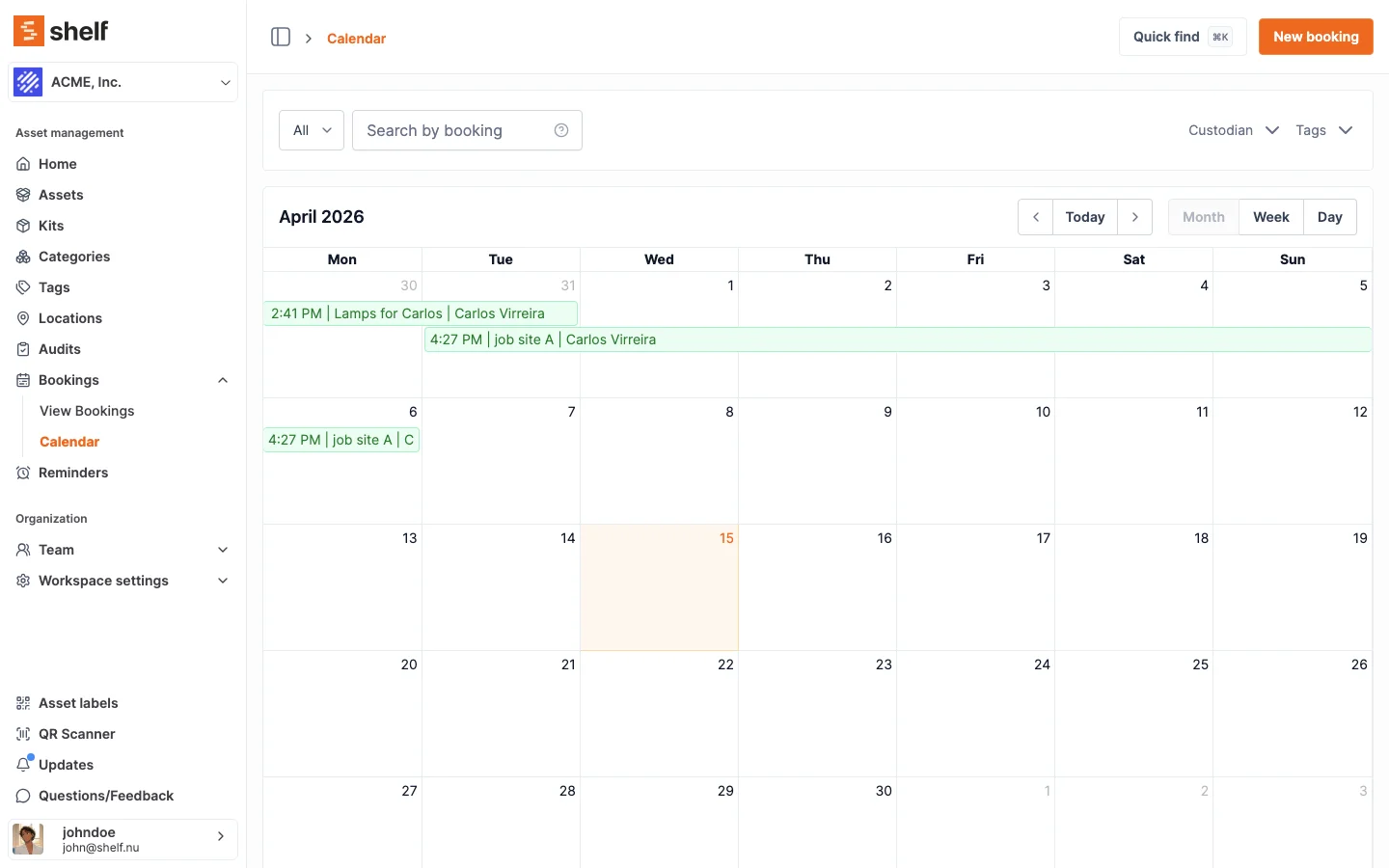
See: Bookings · Booking Calendar
Tag Each Event With Its Venue
Bookings don't have a dedicated venue field, so use tags for it: one tag per venue, set to apply to bookings. You can make tags required, so no booking is saved without one, and filter the bookings list by tag to see everything going to the same venue. The requirement accepts any tag, so give venue tags names that stand out, such as "Venue: Riverside Park". The address and get-in times can go in the booking's description.
Book "12 Tables", Pick the Units at the Warehouse
Most event gear is interchangeable: any 12 of your 40 trestle tables will do. Group identical items under an asset model and book a quantity ("12 tables") without naming which ones. Whoever loads the van scans the actual tables, and the booking records exactly which 12 left. Each table keeps its own QR code and history, which is how you find out that table #31 is the one that keeps coming back with a cracked top.
See: Book by Model
Print the Pick Sheet
Every booking prints as a checklist PDF: each item with its photo, quantity, where it lives in the warehouse, its code and a tick box. Whatever you wrote in the booking's description prints at the top, so the venue address goes to the warehouse on the same sheet.
See: How to Generate a PDF Overview of a Booking
Scan Out at the Dock, Scan Back In After the Event
Every item and kit gets a QR label. The free Shelf Companion app for iPhone and Android scans them to check gear out and back in from the warehouse floor. On a laptop, the web app's scanner does the same with the camera or a handheld barcode scanner.
When a van comes back short, check in what returned and leave the rest out. The booking shows what is still missing and who had it.
See: Equipment Check-In/Out · Partial Check-Ins
Kits: the Gazebo, Its Legs and Its Weights Move as One
Group a gazebo with its legs, weights and bag into a kit with its own QR code. Book the kit and every part comes with it; scan the kit at check-out and all its parts are covered, so the legs can't be left on the shelf.
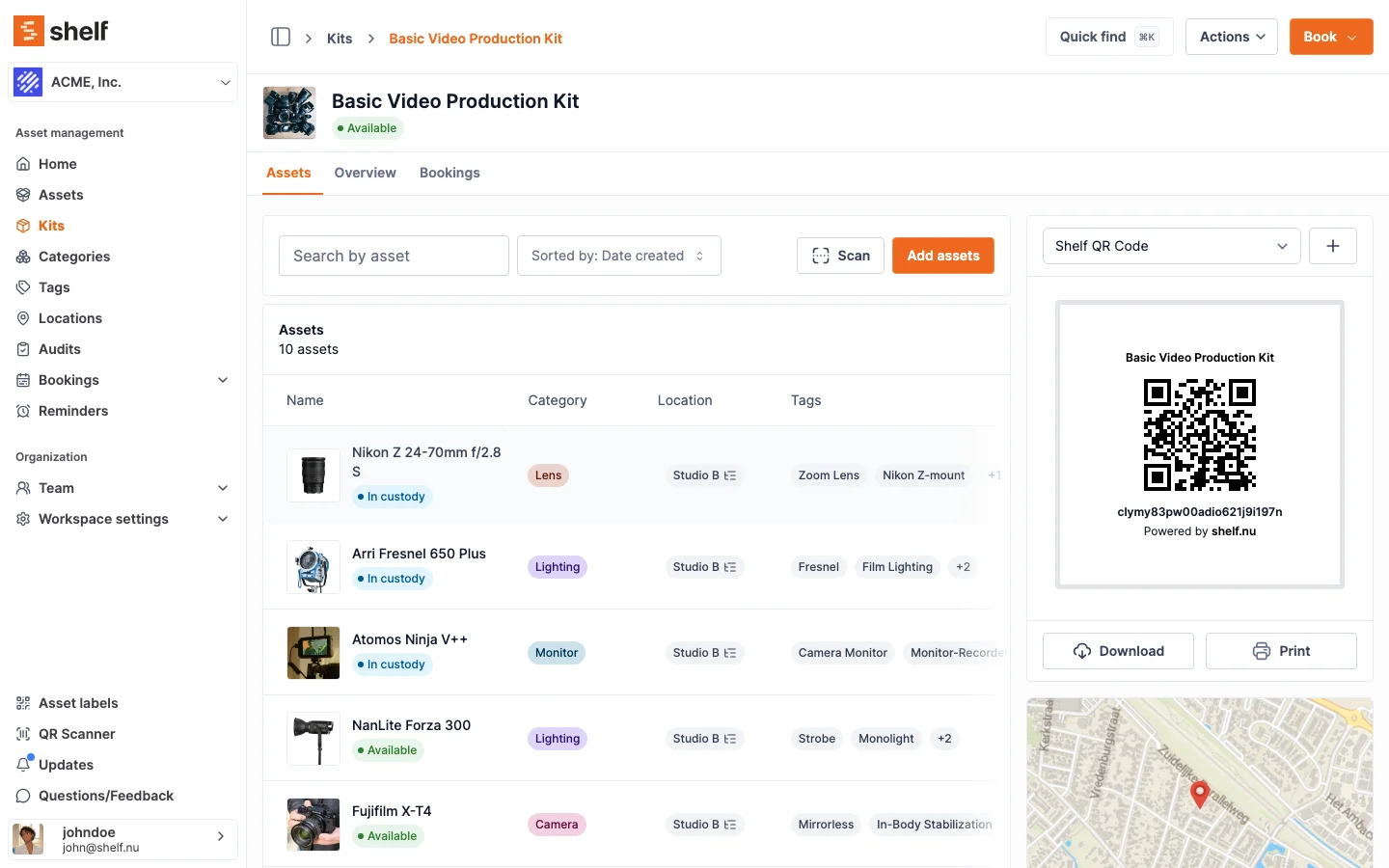
See: Kits
Drinks and Other Stock That Gets Used Up
Wet goods don't need a QR code per can. Track them as a count instead: one record per product, in cases, crates or bottles, and book a number of them to an event, such as 30 cases of water.
When the event is checked in, a quick check-in counts everything still out as used. An explicit check-in lets you split it instead: how many were used, how many came back unopened (back into stock), and how many were lost or damaged. Set a minimum for each product, and every Owner and Admin of the workspace gets an email when stock drops to it, then another once it's restocked.
See: Consumables Tracking
Servicing Reminders for Freezers, Generators and Gazebos
Put a repeating reminder on any item, from daily to yearly. A yearly safety check on each freezer, or a pre-season inspection of every gazebo, keeps coming back without anyone re-entering it.
See: Asset Reminders
Count the Warehouse Between Seasons
When the season ends, an audit lists what should be in the warehouse; you scan what is actually there, and Shelf flags what is found, missing or unexpected.
See: Audits
Moving Over From a Spreadsheet or Another Tool
Save your spreadsheet as a CSV file, or export a CSV from your current tool such as Sortly, and upload it as it is. Shelf suggests which field each column belongs to, shows a few sample values, and lets you check everything before anything is created.
See: Switching From Another Asset Tool · Shelf vs Sortly
What Shelf Does Not Do
No client rental. Shelf has no quotes, invoices, deposits, online store or customer accounts. If your business rents gear to clients, look at software built for rental, such as Booqable, which is what most searches for "event rental software" are after.
No purchasing. Shelf tells you when stock is low; it doesn't raise purchase orders or reorder for you.
Checking out doesn't move gear to the venue. Checked-out gear stays recorded at its warehouse location while it's out. If gear waits at a second store between events, make that store a location and move items there.
Who This Helps
- Festival and outdoor event organisers running marquees, fencing, furniture and bar stock across several sites a season
- Corporate and internal events teams that own their stands, AV and branded kit
- Caterers with their own freezers, chafing dishes, tables and drinks stock
- Venue operations teams moving furniture and staging between rooms and outdoor spaces
- Sports clubs and charities that put on their own fundraisers and match days
Relevant Solutions
- Equipment Reservations — Conflict-free booking for shared gear
- Equipment Check-In/Out — Scan gear out and back in
- Multi-Location Asset Tracking — Warehouses, stores and sub-locations
- Maintenance Tracking — Service history and repeating reminders
- Mobile Asset Auditing — Count the warehouse with your phone
Getting Started
- Bring your list: upload your spreadsheet or your current tool's export as a CSV file and check how the columns map.
- Group what belongs together: identical tables and chairs under one model, gazebo parts in a kit.
- Set up your stock: track drinks and other used-up items as counts, with a minimum.
- Label everything: print QR labels for items and kits.
- Book the next event: create a booking, tag the venue, add the gear, print the checklist and scan it out at the dock.
Frequently Asked Questions
Can Shelf handle renting our gear to clients?
No. Shelf has no quotes, invoices, deposits or online checkout. It is for gear your own team uses at its own events. Rental businesses need dedicated rental software.
Can we book 12 tables without choosing which 12?
Yes. Group the tables under an asset model and book a quantity. Whoever loads the van scans any 12, and the booking records which ones went.
Where do we record the event venue?
With a tag. Make one tag per venue for bookings, make tags required so every event gets one, and filter the bookings list by tag to see everything headed to a venue. The requirement accepts any tag, so clear venue names help. The address can go in the booking description, which prints on the checklist.
Can the warehouse team check gear out from a phone?
Yes. The free Shelf Companion app for iPhone and Android scans item and kit QR codes to check gear out and back in.
What happens to drinks stock when an event is checked in?
A quick check-in counts it all as used. An explicit check-in lets you split it into used, returned unopened (back into stock), lost and damaged. If stock falls to the minimum you set, every Owner and Admin gets an email.
Which plan does an events team need?
Team, because bookings, the booking checklist and booking by quantity are Team features. Kits, asset models and stock counts are on every plan, repeating reminders start at Plus, importing a spreadsheet yourself starts at Plus, and audits are a paid add-on to Team. See pricing.
Can we bring our data from Sortly?
Yes. Upload Sortly's CSV export as it is. Shelf suggests a field for each column, you check the mapping and a preview, and then import.
Ready to organize your assets?
Join thousands of teams who trust Shelf to manage their physical assets. Free forever, or try the Team plan free for 7 days.
Out in the field? Shelf Companion is free on iPhone & Android.