
Shelf vs Wasp Barcode
Wasp Barcode Alternative
Compare Wasp Barcode and Shelf to understand how barcode-based asset tracking differs from QR-first equipment operations.

Wasp Barcode Alternative
Wasp Barcode Technologies has been selling barcode-based asset tracking to small and mid-sized businesses since the 1990s. Their model is distinctive: Wasp bundles proprietary hardware—barcode scanners, label printers, and rugged mobile computers—with their AssetCloud software, positioning themselves as an all-in-one provider. Teams exploring alternatives typically want to stop buying dedicated scanning hardware, move to smartphone-based workflows, and gain operational features like equipment booking and kit management that hardware-era platforms were never designed to support.
Overview: Wasp Barcode vs Shelf
Wasp Barcode takes a hardware-first approach. Their AssetCloud platform comes in two variants: a cloud-hosted subscription (starting around $995/year) and AssetCloudOP, a self-hosted option with a one-time license starting around $1,795 for one user up to $6,995 for five users—plus an 18% annual maintenance fee after year one. Both versions are designed to work with Wasp-branded scanners, printers, and mobile computers, though the software also supports iOS and Android devices.
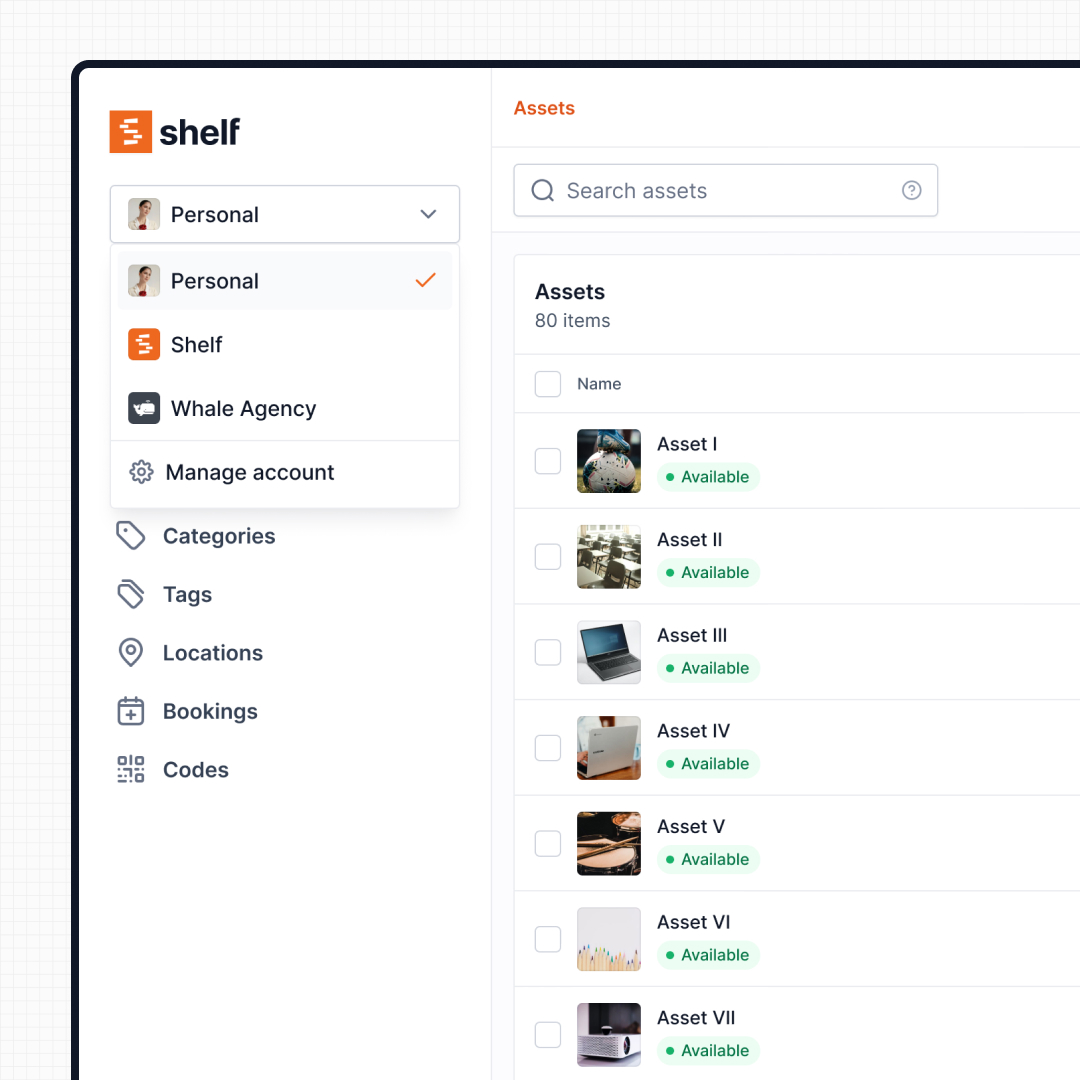
Shelf is hardware-independent. QR labels can be printed on any label printer or standard office printer, and any smartphone camera serves as the scanner. There are no proprietary devices to purchase, maintain, or replace. Beyond eliminating hardware costs, Shelf provides operational depth that Wasp was not built for: booking systems with conflict-free scheduling, custody chains, kit management with parent-child tracking, and multi-department workspaces.
Where Shelf Takes a Different Approach
1. Smartphone-Native, No Dedicated Hardware
Wasp markets itself as the only provider that bundles software, hardware, and asset tags into a single purchase. Their hardware kits include devices like the DR5 mobile computer, WWS650 pocket scanner, and WPL308 label printer. While convenient for organizations starting from scratch, it locks teams into proprietary devices that need maintenance, replacement, and training.
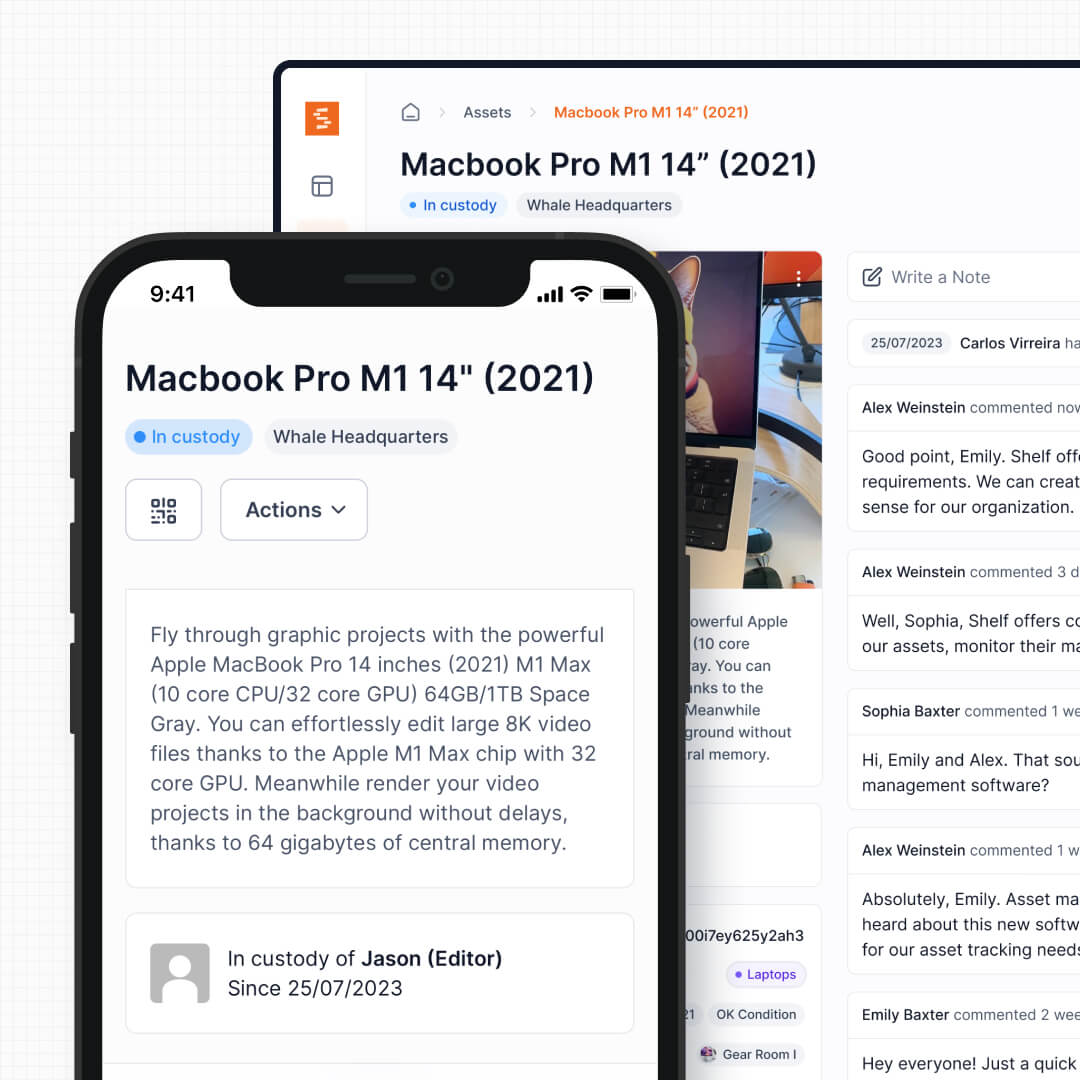
Shelf works with the phones your team already carries. Every QR scan triggers an operational workflow—check out, return, transfer custody—without purchasing or maintaining dedicated scanning hardware. New staff can scan and act immediately, with no device training required.
See: Custody
2. QR Codes Over Traditional Barcodes
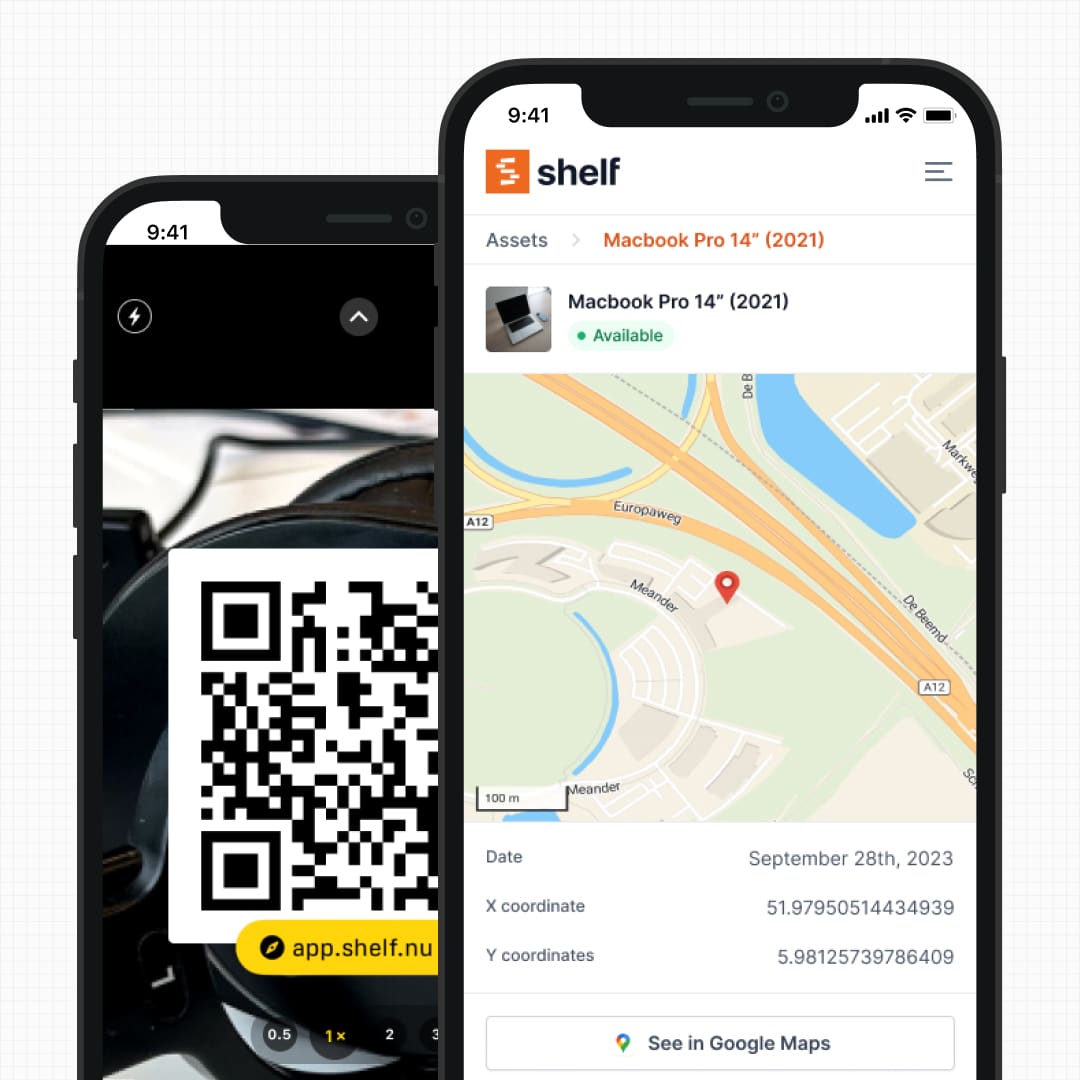
Wasp’s system is built around traditional 1D and 2D barcodes that require dedicated readers positioned at close range with direct line-of-sight. QR codes are fundamentally different: scannable with any phone camera, readable at wider angles and distances, and each code links directly to a web-based asset page where users can take immediate action—check out, report damage, view history—without opening a separate desktop application.
See: Location Tracking
3. Built-In Booking for Shared Equipment
Wasp AssetCloud provides check-out and check-in tracking, but it does not include a reservation or scheduling system. Teams that share equipment—projectors, vehicles, cameras, testing instruments—have no way to book items ahead of time or see future availability within the platform.
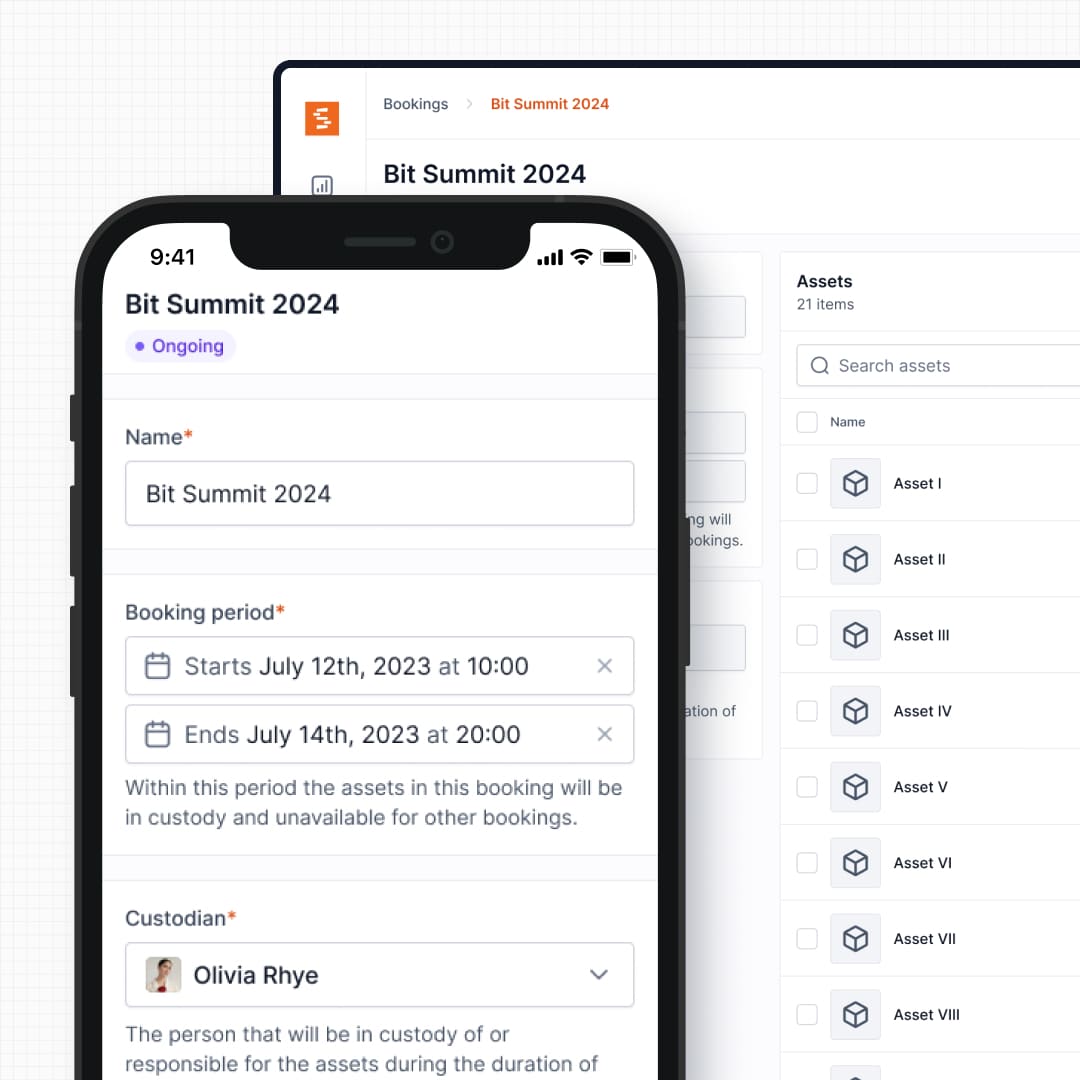
Shelf includes native booking with a calendar view, conflict-free scheduling, and real-time availability. Users reserve equipment in advance, and the system prevents double-bookings automatically. No separate scheduling tool or spreadsheet required.
See: Bookings
4. Kit and Accessory Management
Wasp tracks individual assets in flat lists. Each barcode corresponds to a single item, with no native way to group related equipment into logical sets. If a team checks out a presentation kit with a projector, laptop, clicker, and cables, each piece is tracked independently.
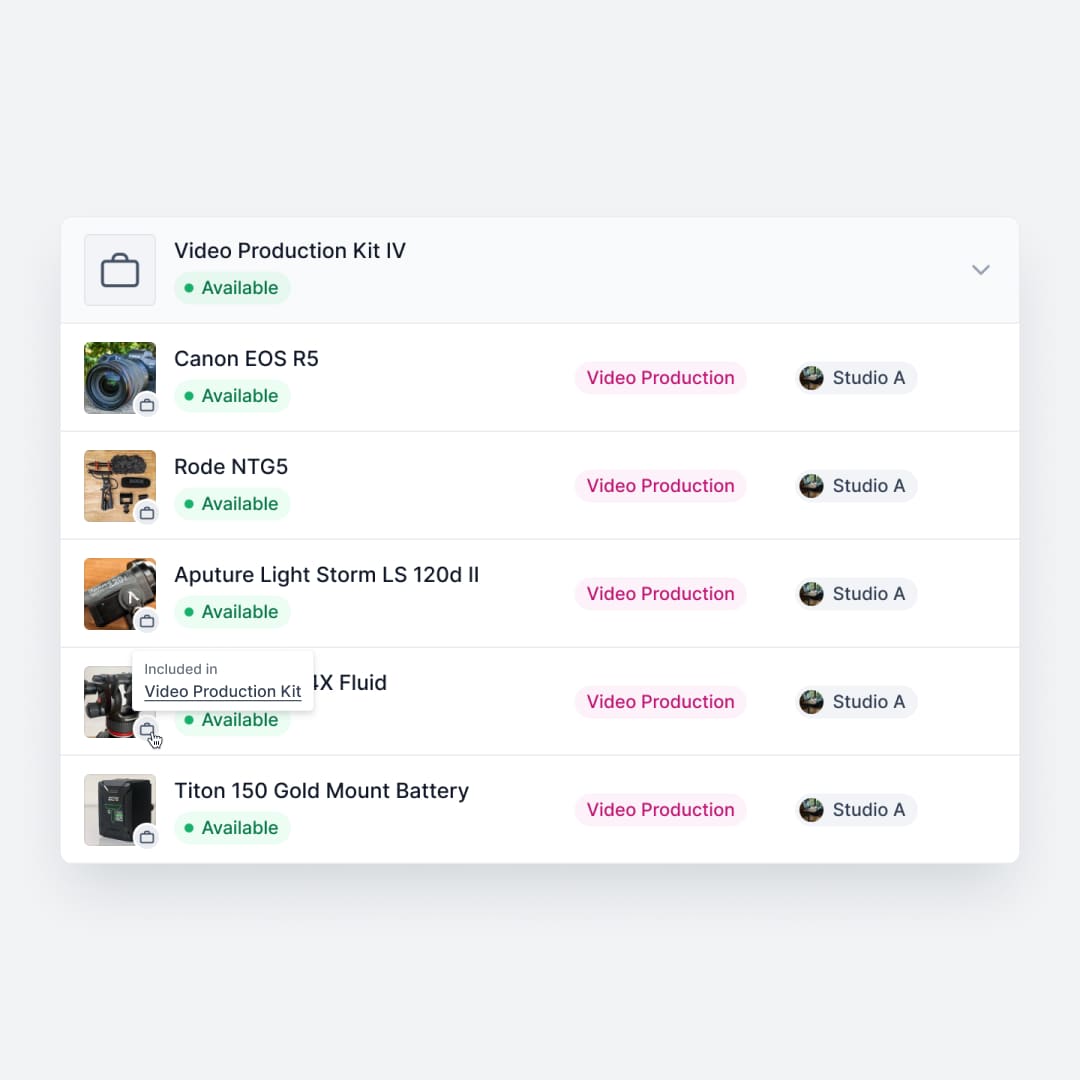
Shelf groups related items into kits with parent-child relationships. Book a presentation kit, and all components are reserved, checked out, and verified together on return. Shelf flags missing pieces automatically, reducing loss of accessories and peripherals.
See: Kits
5. Transparent Pricing vs. Hardware Lock-In
Wasp’s pricing can escalate quickly. Beyond the software license, organizations pay for barcode scanners, mobile computers, label printers, and ongoing maintenance. The RFID module is a separate paid add-on that requires Wasp-approved RFID hardware and RFID tags. Maintenance and support renewals at 18% of the license cost add up year over year.
Shelf uses transparent per-seat pricing with no hardware requirements. Teams print QR labels on any printer and scan with existing smartphones. There are no add-on modules, no hardware lock-in, and no surprise maintenance fees.
6. Modern Interface vs. Legacy Design
Wasp AssetCloud’s interface reflects its on-premise desktop software origins. Users and reviewers consistently note that the reporting system has a steep learning curve, the report designer lacks basic functionality like a working undo button, and the overall system can feel dated. Quick Search only covers a limited set of pre-defined columns, which can make finding specific assets frustrating.
Shelf is browser-native with a modern, responsive interface designed for speed. Search works across all asset fields, filtering is immediate, and the design prioritizes the actions teams perform most: scanning, checking out, returning, and transferring equipment.
7. Cloud-Native and Open Source
Wasp offers both cloud (AssetCloud) and on-premise (AssetCloudOP) options, but the architecture reflects its on-premise roots. AssetCloudOP requires customer-hosted servers, and even the cloud version is a hosted instance of the same legacy codebase.
Shelf is cloud-native and open source. There are no servers to maintain, no software to install, and the full source code is available on GitHub for teams that want to inspect, contribute, or self-host. Updates ship continuously without manual upgrades or downtime.
8. Multi-Department Workspaces
Wasp AssetCloud does not offer workspace separation. Organizations with multiple departments—IT, facilities, media, operations—share a single asset pool. Controlling who sees and manages what requires manual permission configuration.
Shelf separates inventories by department, program, or location through dedicated workspaces. Each team manages its own equipment independently while the organization retains visibility across all departments.
See: Workspaces
Reports — Operational Visibility
Wasp Barcode includes a library of inventory and asset reports rooted in its barcode/scanner workflow. Shelf includes a built-in Reports area on every plan with ready-to-run reports for the modern equipment-operations workflow — Booking Compliance, Top Booked Assets, Top Booked Kits, Monthly Booking Trends, Overdue Items, Asset Inventory, Asset Activity Summary, Asset Utilization, Idle Assets, Asset Distribution, and Custody Snapshot. Every report exports to CSV; chart-based reports also export to PDF.
When Teams Choose Shelf Instead of Wasp Barcode
- Teams eliminating hardware costs: No barcode scanners, no dedicated mobile computers, no proprietary label printers—just smartphones and printed QR labels
- Organizations needing booking workflows: Shared equipment environments require reservation and scheduling features that Wasp does not provide
- Operations managing kits and accessories: Multi-component equipment needs grouped tracking, not individual barcode scans on flat asset lists
- Multi-department organizations: Workspace separation gives each team its own inventory without complicated permission setups
- Teams replacing outdated interfaces: Staff across all technical levels can use Shelf immediately without the steep learning curve reported with Wasp’s reporting and search tools
- Budget-conscious teams: Transparent per-seat pricing with no hardware purchases, RFID add-on fees, or annual maintenance surcharges
When Wasp Barcode May Be a Better Fit
- Organizations with existing Wasp hardware investments: Teams that have already purchased Wasp scanners, printers, and mobile computers may want to continue using that infrastructure
- Strict on-premise requirements: AssetCloudOP supports self-hosted deployments for organizations that cannot use cloud-hosted solutions due to regulatory or connectivity constraints
- High-throughput warehouse environments: Dedicated barcode scanning hardware with physical triggers can be faster than phone cameras in environments where thousands of items move through a single scan point daily
- RFID-dependent workflows: Teams that specifically require RFID tracking with long-range, multi-tag reads may benefit from Wasp’s RFID add-on module and compatible hardware
Case Studies
See how teams modernize their tracking workflows after moving away from hardware-dependent systems:
- CES Utility Solutions — $70K Equipment Recovery
- ResQ Contact Center — 4,000+ Devices Across Multiple Sites
- HAARP — Research Equipment Accountability
- Fabel Film — Eliminating Double Bookings
Related Solutions
Quick comparison
| Feature | Shelf | Wasp Barcode |
|---|---|---|
| Free plan with unlimited assets | Varies | |
| Open source & self-hostable | ||
| QR codes with custom branded labels | Varies | |
| Custody tracking with full audit trail | Varies | |
| Equipment bookings & reservations | Varies | |
| Kit-aware check-in/check-out | Varies | |
| Location hierarchy (up to 12 levels) | Varies | |
| CSV import from any tool | Varies | |
| Works on any device (PWA) | Varies | |
| No credit card to start | Varies |
Feature availability for Wasp Barcode may vary by plan. We encourage you to verify on their website.
Compatibility Checker
Will your Wasp Barcode Barcodes
Work with Shelf?
Camera preview
Supported barcode types: Code128, Code39, QR Code, DataMatrix, EAN-13, EAN-8, UPC-A, UPC-E, ITF, Code93.
If your barcode doesn't scan, it may be due to camera focus, lighting, or barcode quality. This doesn't necessarily mean your code isn't supported — try again or upload a clearer image.

Ready to switch from Wasp Barcode?
Create a free account and import your data in minutes. No credit card required.
Also compare
Evaluating alternatives? See how Shelf stacks up against similar tools.




Ready to organize your assets?
Join thousands of teams who trust Shelf to manage their physical assets. Free forever, or try the Team plan free for 7 days.
Out in the field? Shelf Companion is free on iPhone & Android.