

How Shelf Decides to Send You a Notification

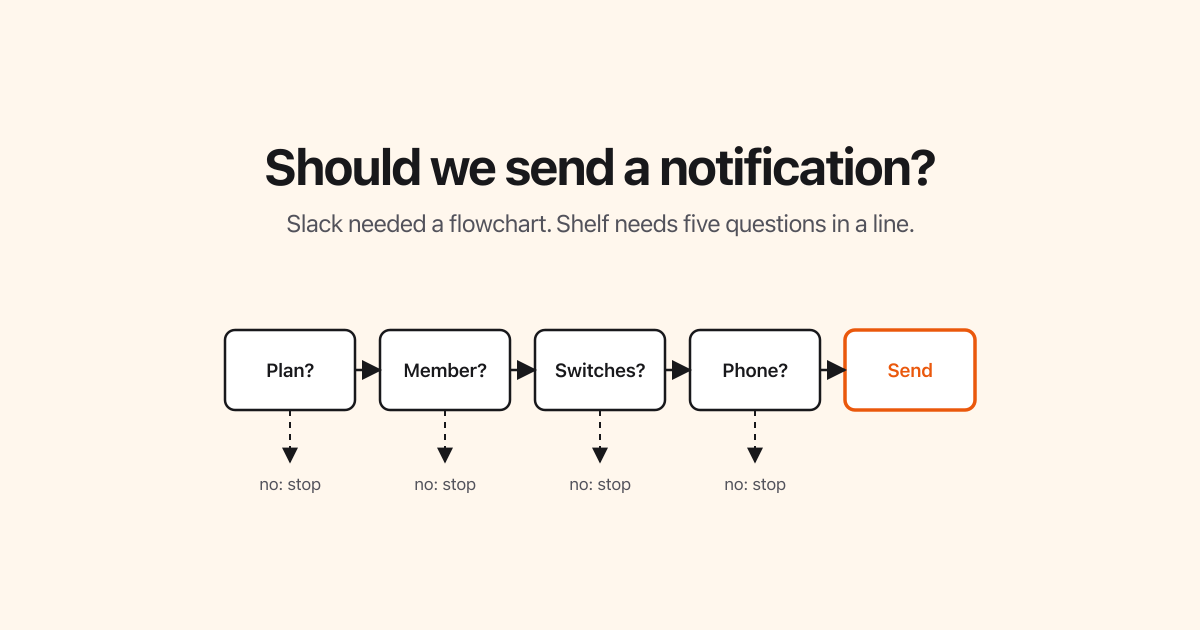
Every few years someone reposts Slack's notification flowchart. It is a wall of boxes and arrows from 2017 titled "Should we send a notification?", and it gets shared as proof that even a simple-sounding question turns into a maze once real software has to answer it.
Sophie Alpert wrote a good rebuttal, Everyone is wrong about that Slack flowchart: most of the maze is the same question asked six times in six places, plus two sets of settings treated as different worlds when they are almost the same. Redrawn with the right framing, the chart is a handful of boxes in a straight line.
We built push notifications for Shelf Companion this autumn, and we had that post pinned to the wall. They shipped in Shelf Companion 1.7.0 on the App Store and Google Play, on the Plus, Team and Enterprise plans. This is the version we ended up with. It is short enough to draw, and we would like to keep it that way, so here it is in public where it can be held against us.
Two questions, asked at different moments
Every notification Shelf sends answers two separate questions.
Who is this about? That is decided the moment something happens: a booking is reserved, an audit is assigned to you, a reminder on an asset comes due. The answer depends on the thing that happened and on nothing else.
May we send it to them right now? That is decided in the background, seconds later, when the push is about to leave. The answer depends only on you: your plan, your membership, your switches, your phone.
Keeping those two apart is most of what keeps the picture small. The code that knows about bookings never has to know about your settings, and the code that knows about your settings never has to know what a booking is.
Whether to send: five questions in a line
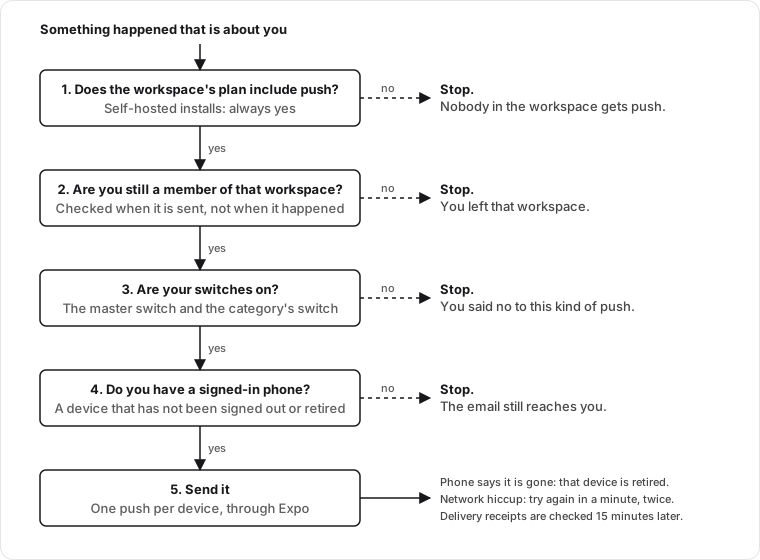
Every push, whatever triggered it, goes through the same five questions in the same order, and the first "no" ends it.
- Does the workspace's plan include push? Plus, Team and Enterprise do; Free does not. If not, nobody in that workspace gets pushes and the chain stops here. On a self-hosted Shelf this is always yes.
- Are you still a member of that workspace? This is checked when the push is sent, not when the event happened. If your access was removed in between, the push is not sent. What happens in a workspace you left is no longer yours.
- Are your switches on? You have one master switch and one switch per category: Bookings, Audits, and Stock and reminders. A push is sent only when the master switch and its category are both on. If you have never touched them, they are on.
- Do you have a signed-in phone? A device you signed out of, or one the phone's platform told us no longer exists, does not count. If you have no device, the email still reaches you.
- Send it. One push per device. If the platform answers that a device is gone, that device is retired so we stop trying. If the network hiccups, we try again a minute later, at most twice. A quarter of an hour later we read the delivery receipts and retire any device they report as unregistered.
That is the whole decision. There is no per-booking override, no "but what if it is a reminder" branch, no second set of switches for a particular workspace. If you want fewer pushes, there are exactly four switches, and they mean what they say.
Who it is about: email is for everyone, push is for you
The question that produces most of Slack's boxes is not "may we send" but "to whom". We answered it with one sentence that holds for every event in the product:
An email goes to everyone with a reason to know. A push goes only to the person the event is about, and never to the person who caused it.
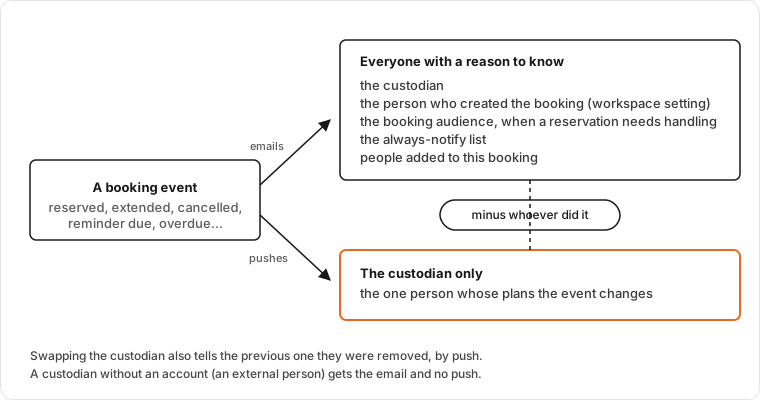
Take a booking. When it is reserved, extended, cancelled, or becomes overdue, the email can reach up to five kinds of people: the custodian, the person who created the booking if the workspace wants that, the workspace's booking audience when a reservation needs handling, an always-notify list, and anyone added to that specific booking. The push reaches one of them: the custodian. It is their plans the event changes. Everyone else is being kept informed, and an email is the right weight for that.
Two consequences follow without any extra rules:
- You are never pushed about your own action. If you reserve a booking for yourself, you already know. The email list keeps you so the record is complete; the push drops you.
- An external custodian, someone without a Shelf account, gets the email and no push. There is no phone to send to, and nothing special has to be written to handle that.
The same sentence covers the other categories. An audit assignment pushes the people assigned to it. An asset reminder, such as a calibration or maintenance date, pushes the team members the reminder was set for. Each of those is a one-line answer in the code, which is how we know the sentence is doing its job.
There is one deliberate addition: when a booking's custodian is swapped for someone else, the previous custodian gets a push saying they were removed. Without it, the only person whose plans changed would be the only one not told.
On your phone: one tap, the right place
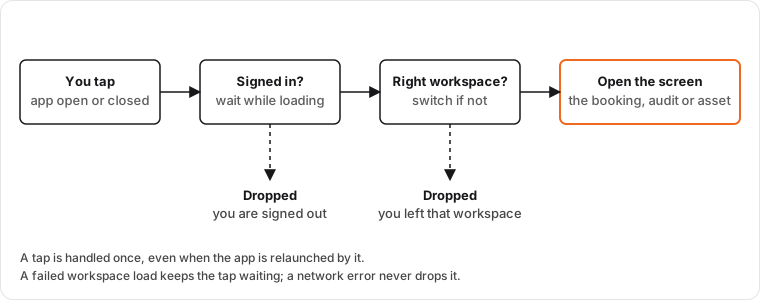
A push is a promise that tapping it takes you to the thing it is about. The app keeps that promise with the same patience whether it was already open or the tap launched it:
- It waits until you are signed in and your workspaces are loaded. A slow network is a reason to wait, never a reason to give up.
- If the push is about a different workspace than the one you are looking at, the app switches first, then opens the screen. You never see one workspace's list under another workspace's name.
- If you have since left the workspace the push came from, the tap is dropped rather than opening something misleading.
- A tap is handled once. Relaunching the app does not reopen it.
What we deliberately did not build
Reading the Slack chart is a good way to list the things you can avoid.
- No separate settings per workspace. Slack's channel settings versus global settings are the single biggest source of its boxes. Your Shelf switches are yours, and they apply to every workspace you are in. Membership, not settings, decides which workspaces can reach you.
- No push for every email. If every email became a push, the push would be worth nothing. The email list and the push list are different on purpose.
- No "notify anyway" button for the sender. The person reserving a booking cannot force a push past your switches. If you turned a category off, that is the end of it.
- No per-event exceptions in the sending code. The five-question chain does not know what kind of event it is carrying. If a future feature needs a special case, the right place for it is in the one-sentence audience rule, not in a sixth question.
What is still open
We are not pretending the problem is finished, only that the picture is.
- Nothing is ever withdrawn. If a booking is cancelled ten seconds after you were pushed about it, the push still sits on your lock screen. We refuse to send stale reminders (a checkout reminder for a booking that is no longer waiting to be checked out is dropped at send time), which removes the worst case, but we do not retract notifications that already went out. Slack lists the same open question.
- One sentence for the audience is a rule we have to keep choosing. It would be easy to add "and also push the creator when..." the first time someone asks. The day we do, we should change the sentence, not add a branch.
Where the switches are
Update Shelf Companion to 1.7.0, open Settings, then Notifications, and tap Turn on notifications. Only then does the app ask the phone for permission; after that you will find the master switch and the three categories. The same switches are on the web under Account settings → Notifications. Turning the master switch off silences everything at once and keeps your category choices for when you turn it back on. The full list of what pushes, and to whom, is in Push Notifications on Shelf Companion.
If you run into a push that this article says you should not have received, or did not get one it says you should, tell us. The point of writing the rules down is that they can be checked.
Ready to organize your assets?
Join thousands of teams who trust Shelf to manage their physical assets. Free forever, or try the Team plan free for 7 days.
Out in the field? Shelf Companion is free on iPhone & Android.
More from the blog

Take Control of Your Booking Notifications
Shelf now lets workspace admins configure exactly who receives booking email notifications — at both the workspace level and per booking. Reduce noise, add coverage, and keep the right people informed.

How We Used to Think About Native Apps — and What Changed
In 2024 we wrote a post explaining why Shelf didn't have native apps. In 2026 we shipped one. Here's the honest story of what changed our mind, what stayed true, and what we'd say differently today.

Industry-Specific CSV Import Examples
One of the most powerful features of Shelf is its ability to import existing asset data via CSV files. To help you get started, we've created a set of industry-specific CSV templates that you can use as a starting point for your own asset management journey.