

QR Code Asset Tracking
Tag every asset with a QR code and track it from any phone — check-in/out, location, custody, and full history with one scan. Open source, free to start.
Trusted by innovative teams

































































QR Code Asset Tracking
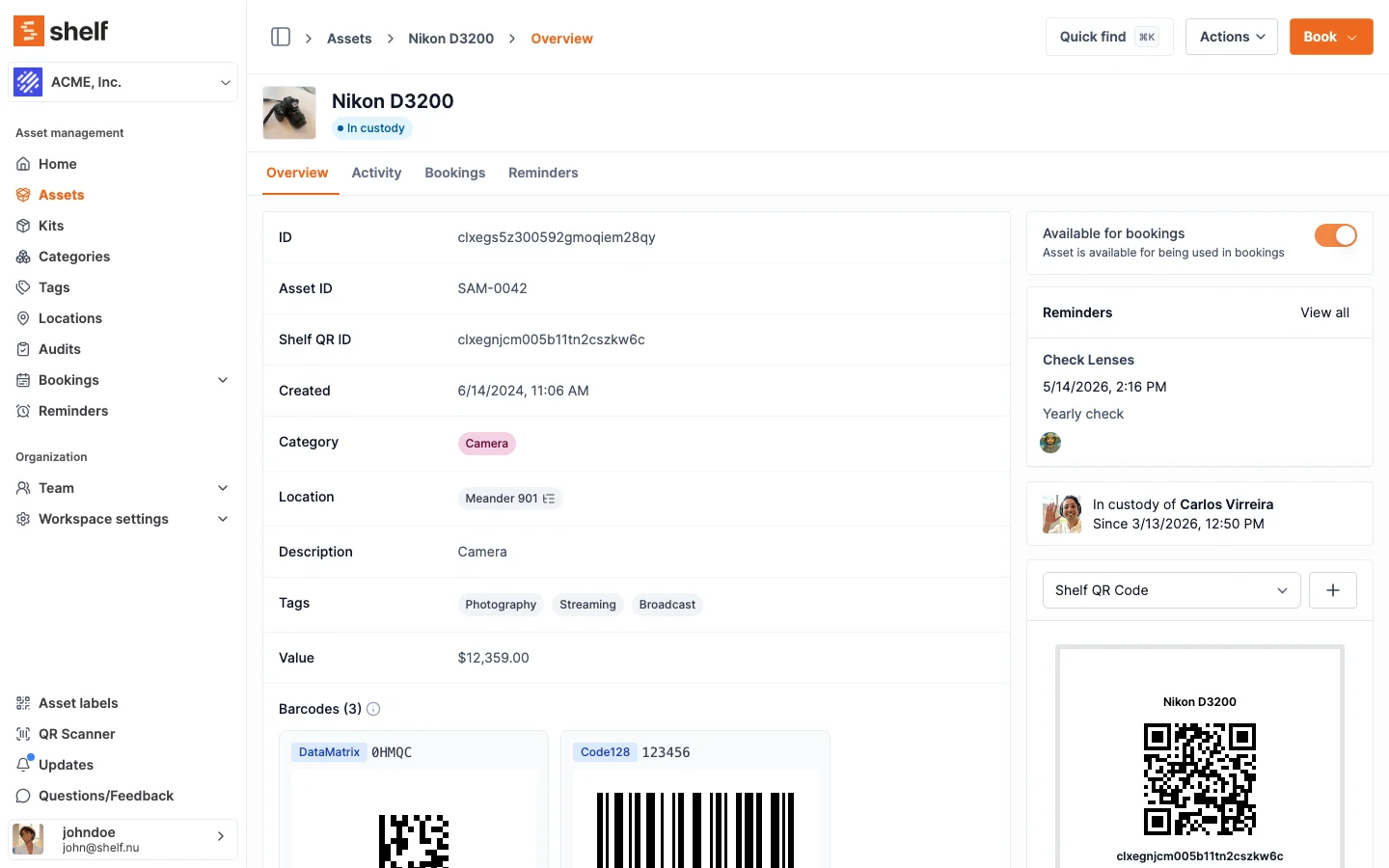
QR code asset tracking replaces sign-out sheets and spreadsheets with a single scan. Every asset gets its own QR code; anyone on the team scans it with a phone to see what it is, where it is, who has it, and its full history — then checks it in or out in seconds.
Shelf is QR-first by design. You generate codes, print them as durable asset tags, attach them to your equipment, and start tracking — no special scanner hardware and no training required. It works in any browser and in the free Shelf Companion app for iPhone and Android.
Why QR Codes Beat Spreadsheets and Sign-Out Sheets
Manual tracking breaks down the moment assets start moving between people, rooms, and sites:
- No real-time status: A spreadsheet is out of date the second someone forgets to update it.
- No accountability: Sign-out sheets don't tell you who currently has an item or when it was due back.
- Slow lookups: Finding a serial number, warranty date, or service history means digging through files.
- Lost and duplicate-bought items: Teams re-buy gear they already own because no one can find it.
- No audit trail: When something goes missing, there's no record of who touched it last.
A QR code turns every physical asset into a live record. Scan it and the truth is on your screen.
How QR Code Asset Tracking Works in Shelf
Generate and Print QR Asset Tags
Every asset in Shelf gets a unique QR code automatically. Print them in batches as labels, size them for anything from a laptop to a hand tool, and use the Asset Label Designer to lay out tags with your own text and codes. Prefer to roll your own? The free QR Code Generator creates codes on demand.
See: Asset Label Designer
Scan to Check In, Check Out, and Update
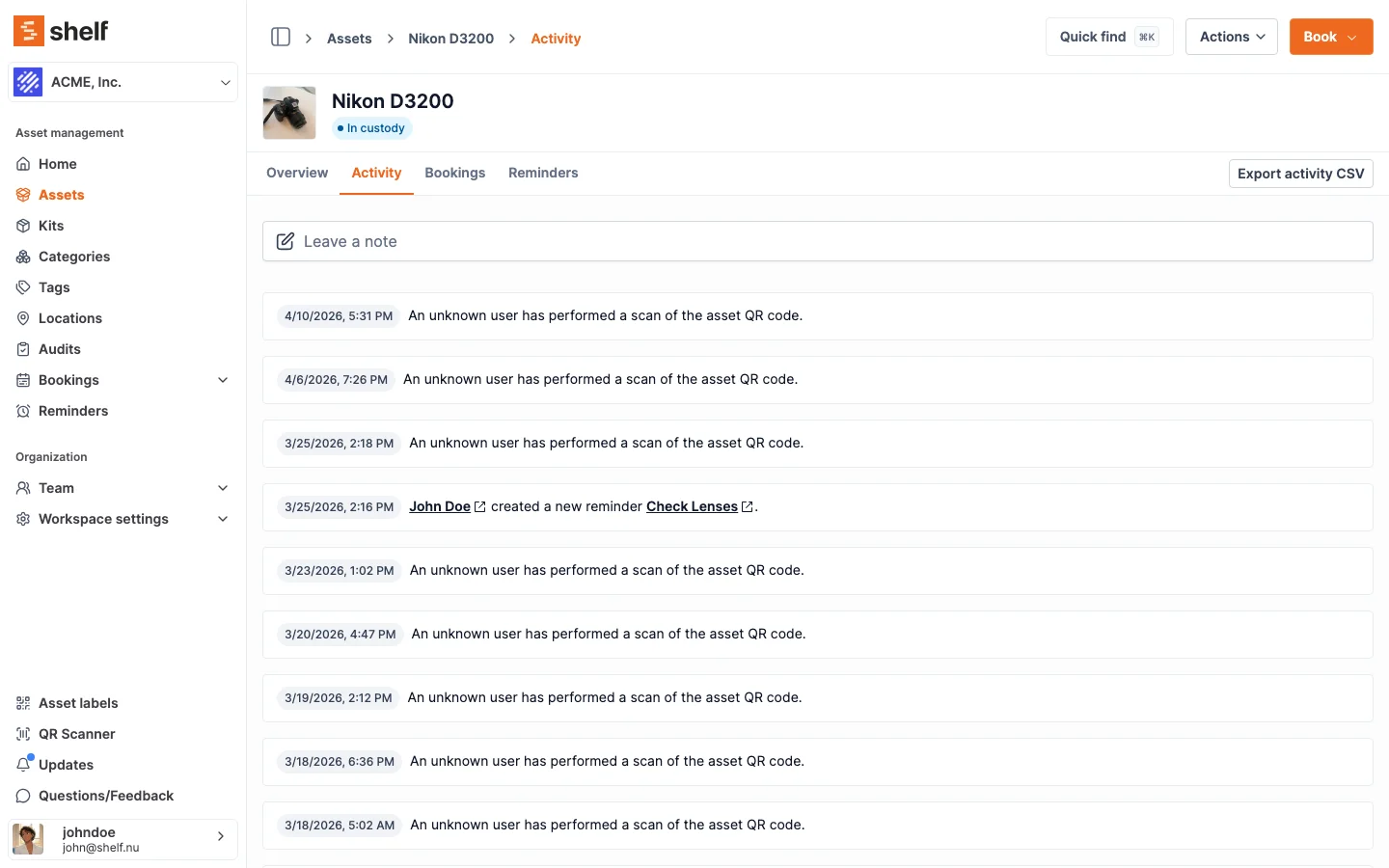
Point a phone camera at the code. From the scan you can check the item in or out, assign custody, update its location, add notes, or view its complete history. No app install is required to use the web app, and the free Shelf Companion app adds fast, offline-friendly scanning in the field.
See: Custody
Know Where Everything Is
Each scan records the asset's current location, so a quick check-in updates its place across rooms, buildings, and sites. Shelf captures the point-in-time location at the moment of a scan — a fast, accurate way to keep records current without continuous GPS hardware on every item.
See: Location Tracking
QR and Barcode Support
Already labelled your fleet with barcodes? Shelf reads them too — Code128, Code39, DataMatrix, EAN-13, and external QR codes — so you can adopt QR-first workflows without re-tagging everything on day one.
Full History on Every Asset
Every scan, custody change, location update, and field edit is logged automatically with a timestamp and the person who did it. The asset carries its own permanent record — ready for audits, insurance, or handovers with no extra paperwork.
Key Features
- Automatic QR codes for every asset — no manual generation
- Batch label printing with the built-in label designer
- Scan from any phone — web app or the free Companion app (iPhone & Android)
- Check-in / check-out and custody assignment in one scan
- Location updates captured at scan time
- Barcode support — Code128, Code39, DataMatrix, EAN-13, external QR
- Automatic activity log for a complete audit trail
- Unlimited assets on every plan, including the free tier
Common Use Cases
- IT hardware: Track laptops, monitors, and peripherals with QR tags; scan to assign to staff.
- AV and camera gear: Check kits in and out for shoots and events; flag missing accessories on return.
- Tools and equipment: Tag shared tools so the whole team can see who has what.
- Lab and field instruments: Scan to record location and custody as equipment moves between sites.
- Fixed assets: Run walk-through audits by scanning tags room by room.
Why Teams Choose Shelf for QR Asset Tracking
- QR-first by design: Not a bolt-on — scanning is the core workflow.
- Free to start: Unlimited assets and QR codes on the free plan. No credit card required.
- No per-asset fees: Tag as many items as you like without pricing penalties.
- Open source: AGPL licensed. Self-host or use the managed cloud.
- Works on any phone: No proprietary scanner hardware to buy.
Frequently Asked Questions
Do I need a special scanner for QR code asset tracking?
No. Any smartphone camera works through the web app, and the free Shelf Companion app for iPhone and Android adds dedicated in-field scanning. There's no proprietary hardware to buy.
Can I print my own QR asset tags?
Yes. Every asset gets a QR code automatically, and you can print them in batches as labels using the built-in Asset Label Designer. You control the size and layout.
Does Shelf track an asset's location in real time?
Shelf records an asset's location each time its QR code is scanned — an accurate, point-in-time update. It is not continuous GPS tracking; location reflects the most recent scan.
Can I use existing barcodes instead of QR codes?
Yes. Shelf supports Code128, Code39, DataMatrix, EAN-13, and external QR codes alongside its native QR codes, so you can keep existing labels while adopting QR workflows.
Is QR code asset tracking free?
Yes — the free plan includes unlimited assets, QR codes, scanning, and custody for a single user. Multi-user features and bookings are on the paid Team plan.
Related Solutions
Ready to organize your assets?
Join thousands of teams who trust Shelf to manage their physical assets. Free forever, or try the Team plan free for 7 days.
Out in the field? Shelf Companion is free on iPhone & Android.