
Shelf vs GoCodes
GoCodes Alternative
Compare GoCodes and Shelf to see how QR code asset tagging differs from QR-first operational equipment management.

GoCodes Alternative
GoCodes is a cloud-based asset tracking platform built around patented QR code labels and GPS tracking. It is popular with construction firms, contractors, and field service teams who need to tag tools, log locations, and maintain check-in/check-out records across job sites. GoCodes plans start at $500/year for 200 assets and 3 users, scaling up to $2,500/year for 2,000 assets—with add-ons like API access, offline mode, and kitting billed separately.
Teams evaluating alternatives typically want more than tagging and location logging. They need operational workflows—bookings, custody chains, grouped kits, and multi-department visibility—built into the core platform rather than bolted on as paid extras.
Overview: GoCodes vs Shelf
GoCodes is designed around asset identification and location capture. Scan a patented QR label, view the asset record, and log GPS coordinates from the scanning device. The platform does this well, and its rugged industrial-grade tags (anodized aluminum, metal-mount options rated from -40 to 200 degrees Fahrenheit) are purpose-built for harsh construction and field environments.
Shelf treats QR codes as operational triggers rather than identification endpoints. Scanning a Shelf label opens a context-aware interface where users see current custody status, upcoming reservations, kit contents, and can immediately perform check-out, return, or transfer actions. Shelf answers not just "what is this and where was it scanned" but "who has it, who needs it next, and what else should be with it."
The distinction matters most for teams where equipment circulates frequently—shared across people, projects, and locations—rather than sitting in fixed positions on a single job site.
Where Shelf Takes a Different Approach
1. QR Scans That Trigger Workflows, Not Just Records
GoCodes scans pull up an asset’s information card and log the GPS coordinates of the scanning device. The interaction is read-and-record: view details, update a field, move on.
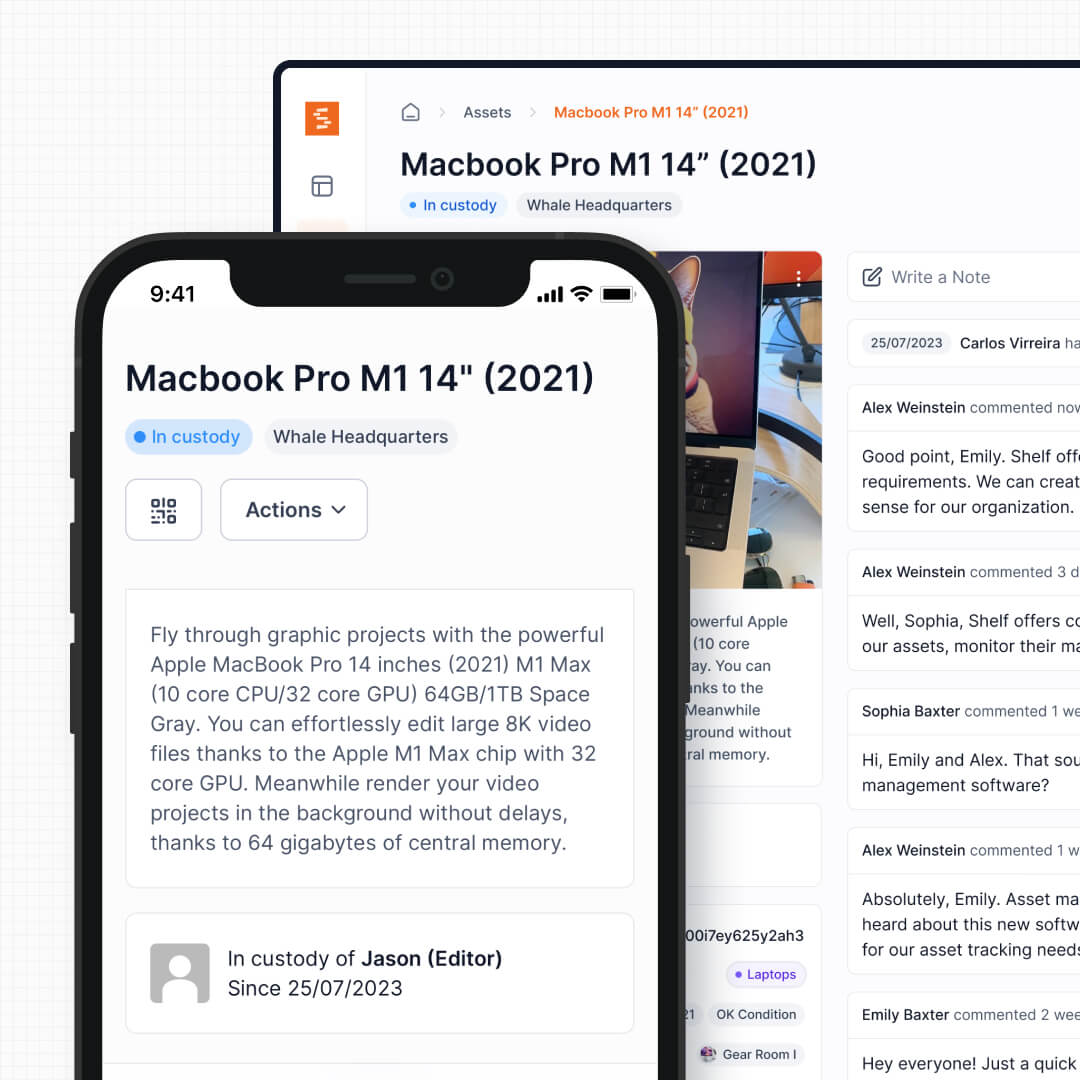
Shelf scans open a full operational interface. The user sees current custody, booking availability, maintenance flags, and kit membership—and can act on all of them immediately. Check out a drill press, return a loaner laptop, transfer custody of a surveying set to a different crew, all from a single scan on any smartphone.
See: Custody
2. Built-In Booking and Scheduling
GoCodes does not include a native reservation or scheduling system. Its check-in/check-out feature records who has an item, but there is no calendar view, no forward-looking availability, and no conflict prevention for future dates. GoCodes itself publishes articles recommending third-party scheduling tools to fill this gap.
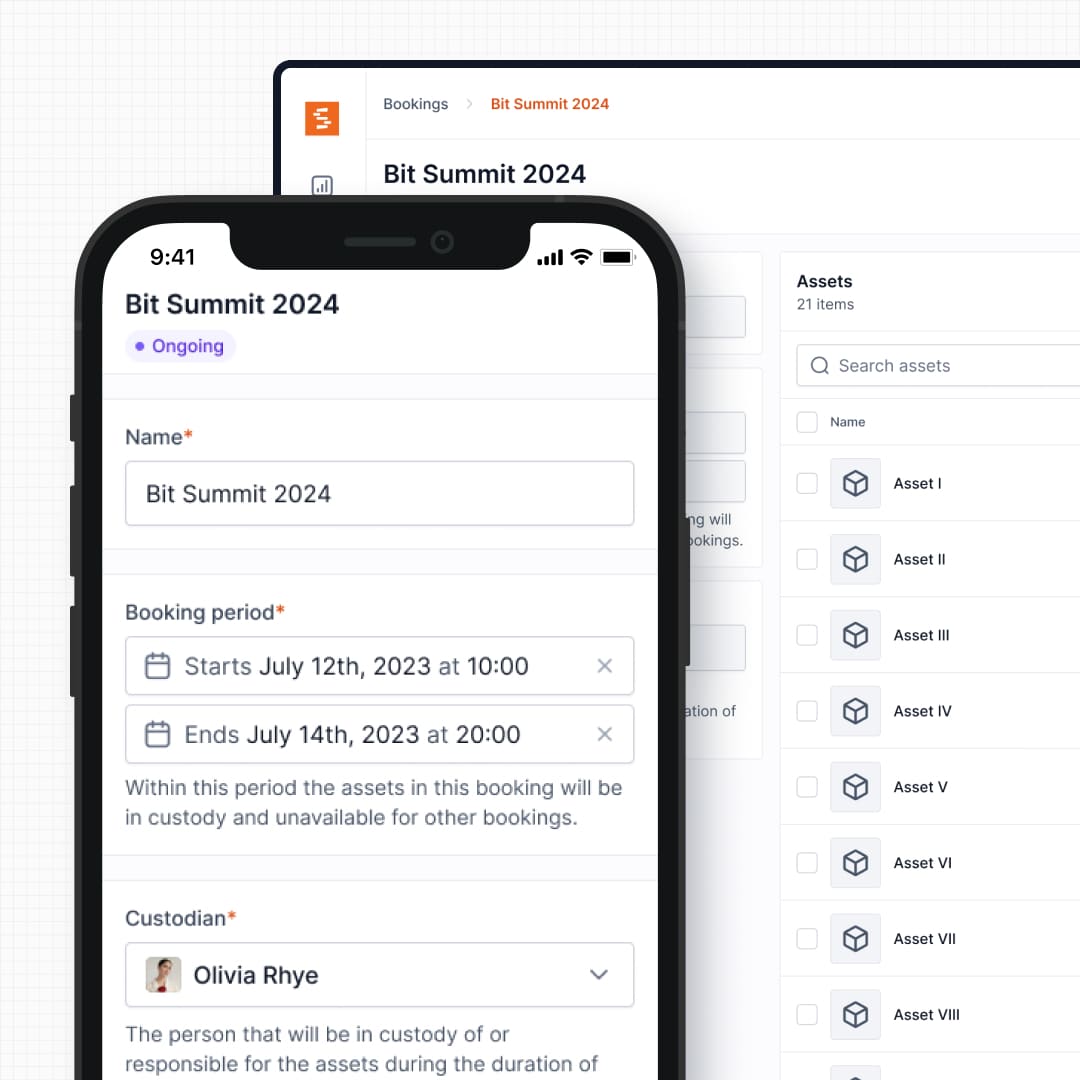
Shelf includes booking workflows as a core feature. Teams reserve equipment in advance, view a calendar of availability across the entire inventory, and prevent double-bookings without spreadsheets or external tools. When a user scans a QR label, they see not only the current status but when the item is reserved next—so they know exactly when it needs to be returned.
See: Bookings
3. Kits Included, Not an Add-On
GoCodes offers kitting as a paid add-on ($250/year on top of the base subscription). The feature lets you group items under a parent record, but it sits outside the core check-in/check-out flow.
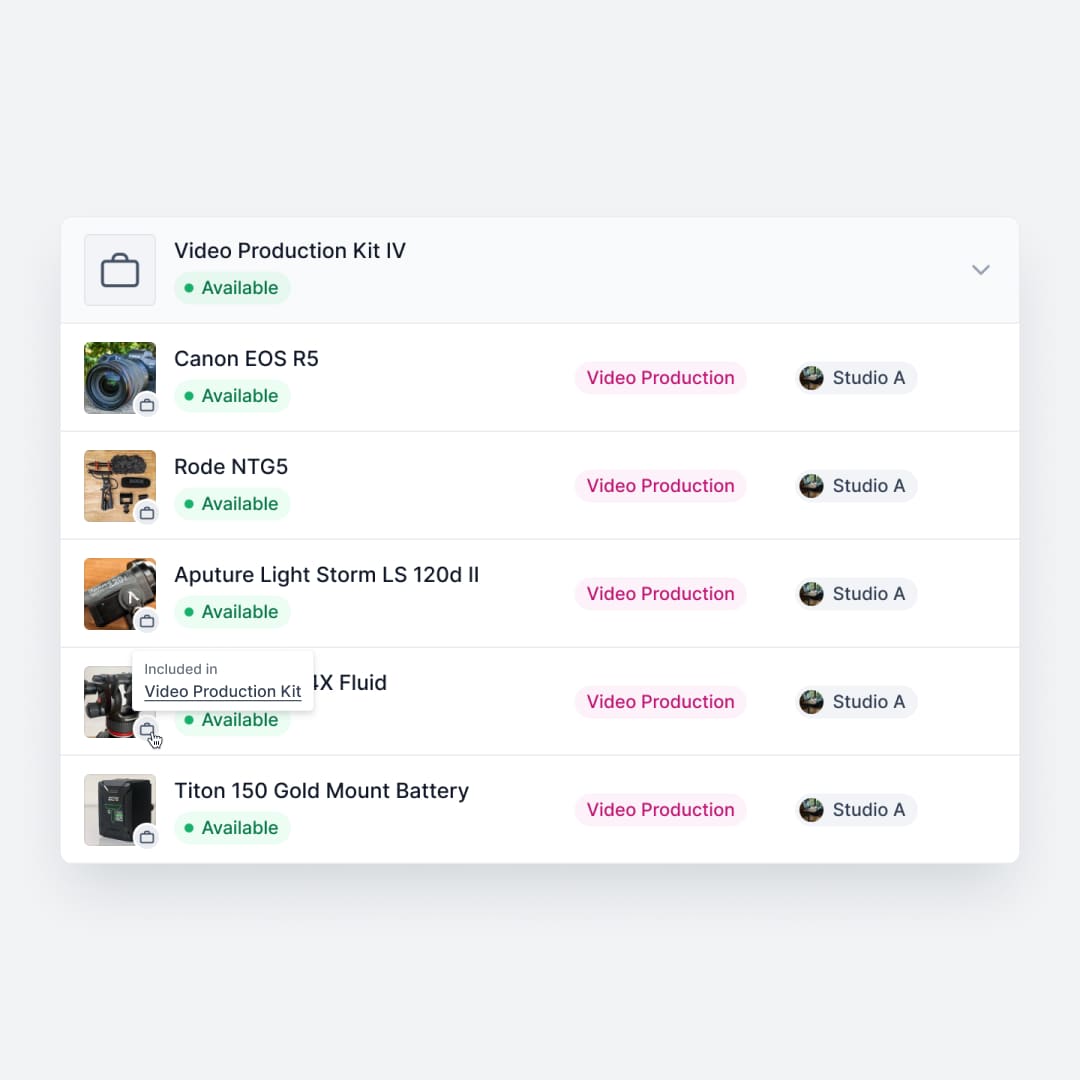
Shelf includes kit management in every plan. Group a camera body, three lenses, a battery pack, and a carrying case into a single bookable kit. Check out the kit, and every component moves with it. Return it, and Shelf flags any missing pieces. Kits integrate directly with bookings, custody, and location tracking—they are not a separate module.
See: Kits
4. Multi-Department Workspaces
GoCodes provides a single organizational inventory. All assets live in one shared view, which can become unwieldy for organizations with multiple departments, locations, or teams that need independent control over their own equipment.
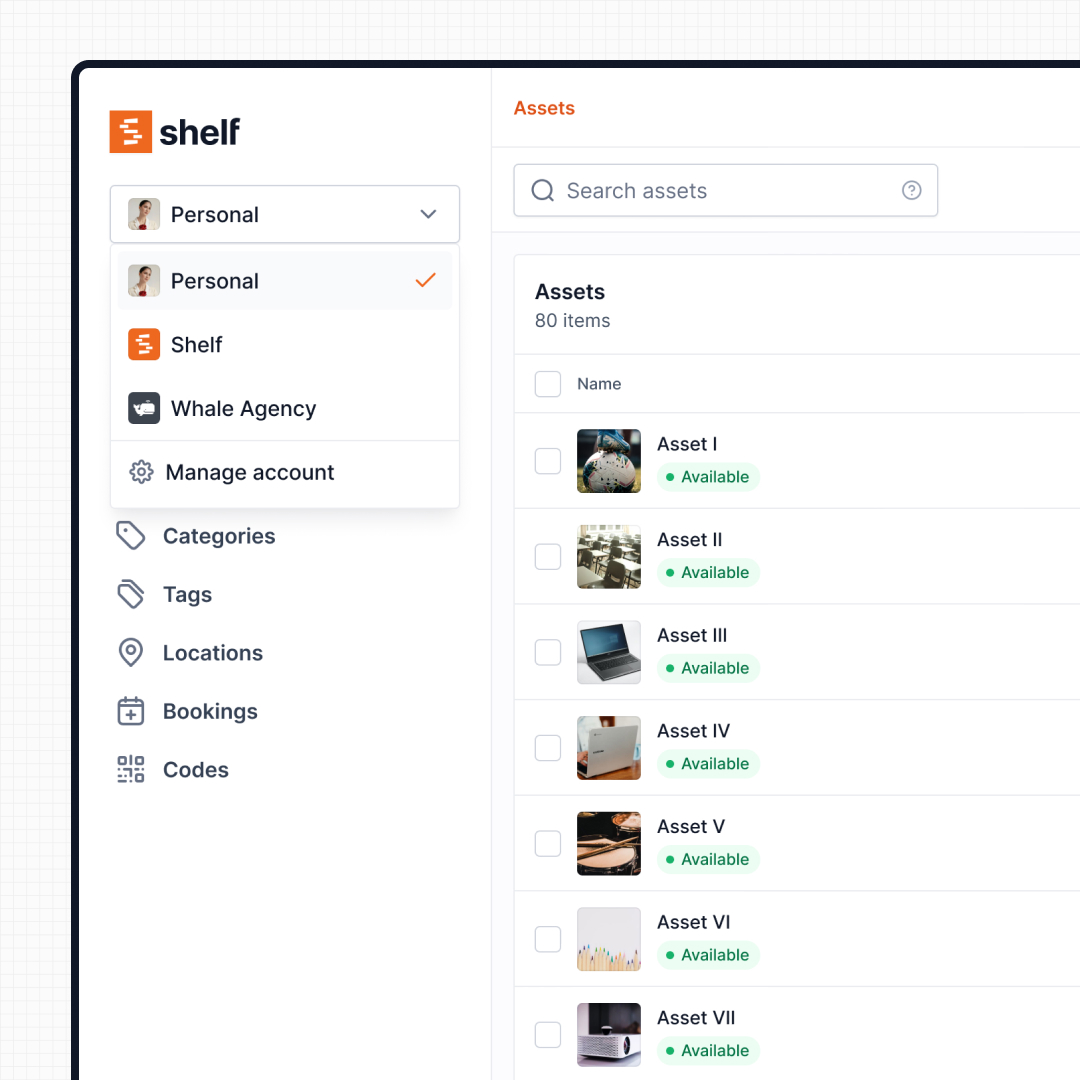
Shelf separates inventories into workspaces. Construction, IT, facilities, and operations teams each manage their own assets independently, with their own team members, categories, and workflows—while the organization maintains cross-department visibility and reporting.
See: Workspaces
5. Transparent Pricing Without Per-Feature Add-Ons
GoCodes pricing scales by asset count and user seats, with several features gated behind additional annual fees: API access costs $1,080/year, offline mode is $350/year, kitting is $250/year, and additional user seats are sold in packs of five for $400/year. These costs add up quickly for growing teams.
Shelf uses straightforward flat-rate pricing — all features included, no add-ons. Bookings, kits, custody tracking, and workspaces are part of the platform, not sold as extras. Teams can plan their costs without worrying about which features will trigger a surprise annual fee.
6. Open Source with Standard QR Codes
GoCodes is a proprietary platform with patented labels. The labels are high quality and durable, but they tie your asset tags to a single vendor. Switching platforms later means replacing every physical label.
Shelf is open source. It uses standard QR codes that teams can generate and print on any label stock, any printer, any material. Your physical tags work regardless of which software platform you use. There is no vendor lock-in on the labels, and the source code is publicly available for inspection, self-hosting, or contribution.
7. User Experience Across Technical Levels
GoCodes is designed primarily for administrators and field workers who scan tags on job sites. Reviewers note that the interface supports mainly global views and can feel limited when managing multiple asset tables or complex organizational structures.
Shelf is built for adoption across all staff levels—from technical administrators to students and non-technical end users. The interface prioritizes clarity and speed: scanning, checking out, and returning equipment requires no training. This matters for organizations where equipment is used by a wide range of people, not just a dedicated operations team.
Reports — Operational Visibility
GoCodes' reporting centers on QR-scan history and basic asset lists. Shelf includes a built-in Reports area with ready-to-run reports — Booking Compliance (on-time vs late returns), Top Booked Assets, Top Booked Kits, Monthly Booking Trends, Overdue Items, Asset Inventory, Asset Activity Summary, Asset Utilization, Idle Assets, Asset Distribution, and Custody Snapshot. Every report exports to CSV; chart-based reports also export to PDF.
When Teams Choose Shelf Instead of GoCodes
Teams often switch from GoCodes when they outgrow tagging-and-logging and need full operational workflows:
- Shared equipment with scheduling conflicts: Multiple users competing for the same gear need forward-looking reservations, not just check-in/check-out records after the fact
- Multi-part kits that travel together: Surveying sets, AV rigs, and toolboxes need grouped management where every component is tracked as a unit—included in the platform, not a paid add-on
- Multi-department organizations: IT, facilities, construction, and operations teams that need independent inventories with centralized oversight
- Budget-conscious teams scaling up: Organizations that want predictable pricing without per-feature surcharges for kitting and additional user seats
- Non-technical users who need to adopt the system: Staff beyond the operations team—students, faculty, creative teams—who need a system they can use without training
- Teams avoiding vendor lock-in: Organizations that prefer standard QR codes they control over proprietary patented labels tied to a single vendor
When GoCodes May Be a Better Fit
GoCodes serves certain use cases well, and may be the better choice when:
- GPS scan-location logging is the core need: Teams that primarily want to capture and map where assets are scanned across a geographic area—GoCodes excels at automatic GPS logging with every scan
- Rugged industrial-grade labels are essential: Environments like concrete pours, asphalt operations, or extreme temperatures where GoCodes’ anodized aluminum and metal-mount tags have a proven track record
- Real-time GPS hardware tracking is required: GoCodes offers optional GPS tracker devices for vehicles, trailers, and heavy equipment with continuous location updates every 30-60 seconds—a different category than QR-based tracking
- Simple tool identification on construction sites: Smaller teams focused on knowing which tools are on which job site, without needing booking calendars or kit workflows
- Existing investment in GoCodes labels: Teams that have already tagged hundreds or thousands of assets with GoCodes’ patented labels and do not need the operational workflows Shelf provides
Case Studies
See how teams build QR-powered equipment operations:
- CES Utility Solutions — $70K Equipment Recovery
- Arellano Associates — Event Equipment Management
- HAARP — Research Equipment Accountability
- Eastern Michigan University — Theatre Equipment Management
Related Solutions
Quick comparison
| Feature | Shelf | GoCodes |
|---|---|---|
| Free plan with unlimited assets | Varies | |
| Open source & self-hostable | ||
| QR codes with custom branded labels | Varies | |
| Custody tracking with full audit trail | Varies | |
| Equipment bookings & reservations | Varies | |
| Kit-aware check-in/check-out | Varies | |
| Location hierarchy (up to 12 levels) | Varies | |
| CSV import from any tool | Varies | |
| Works on any device (PWA) | Varies | |
| No credit card to start | Varies |
Feature availability for GoCodes may vary by plan. We encourage you to verify on their website.
Compatibility Checker
Will your GoCodes Barcodes
Work with Shelf?
Camera preview
Supported barcode types: Code128, Code39, QR Code, DataMatrix, EAN-13, EAN-8, UPC-A, UPC-E, ITF, Code93.
If your barcode doesn't scan, it may be due to camera focus, lighting, or barcode quality. This doesn't necessarily mean your code isn't supported — try again or upload a clearer image.

Ready to switch from GoCodes?
Create a free account and import your data in minutes. No credit card required.
Also compare
Evaluating alternatives? See how Shelf stacks up against similar tools.




Ready to organize your assets?
Join thousands of teams who trust Shelf to manage their physical assets. Free forever, or try the Team plan free for 7 days.
Out in the field? Shelf Companion is free on iPhone & Android.