

Audit Completion: One Report for All Your Audits
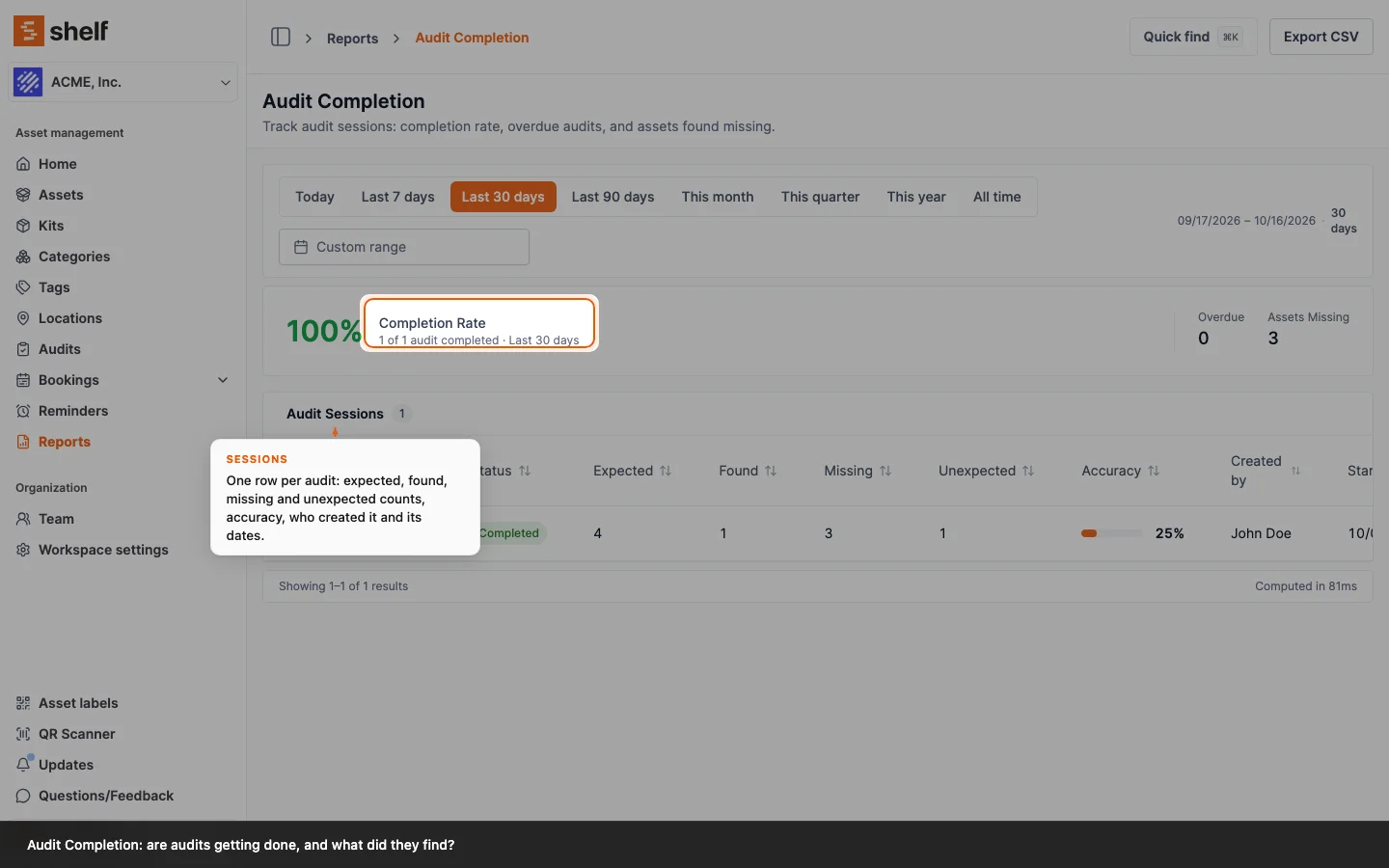
Open Reports → Audit Completion to see every audit created in a timeframe with its completion rate, the overdue audits and the assets found missing. Each row lists the audit's expected, found, missing and unexpected counts and an accuracy figure, and opens the audit. Export the rows to CSV.
The Audits category on the Reports page has its first report. Audit Completion answers "are audits getting done, how accurate are they, and what did they find?" for every audit created in the timeframe you pick. The headline is the completion rate, with the number of overdue audits and the assets found missing beside it. Underneath, one row per audit carries its status, the expected, found, missing and unexpected counts, an accuracy bar, who created it and its started, due and completed dates. Click a row to open the audit, or Export CSV to take the rows with you.
The counting is careful about history. An audit belongs to the period it was created in; a completed audit stays completed after it is archived; cancelled audits are left out of the rate; and the assets-missing total only adds up audits that were completed, because a running audit's missing counter is still moving. Reports are for Owners and Administrators, and the report fills up for workspaces using the Audits add-on.
Ready to organize your assets?
Join thousands of teams who trust Shelf to manage their physical assets. Free forever, or try the Team plan free for 7 days.
Out in the field? Shelf Companion is free on iPhone & Android.