

Introducing QR Scan-to-Add: Transforming Asset Bookings

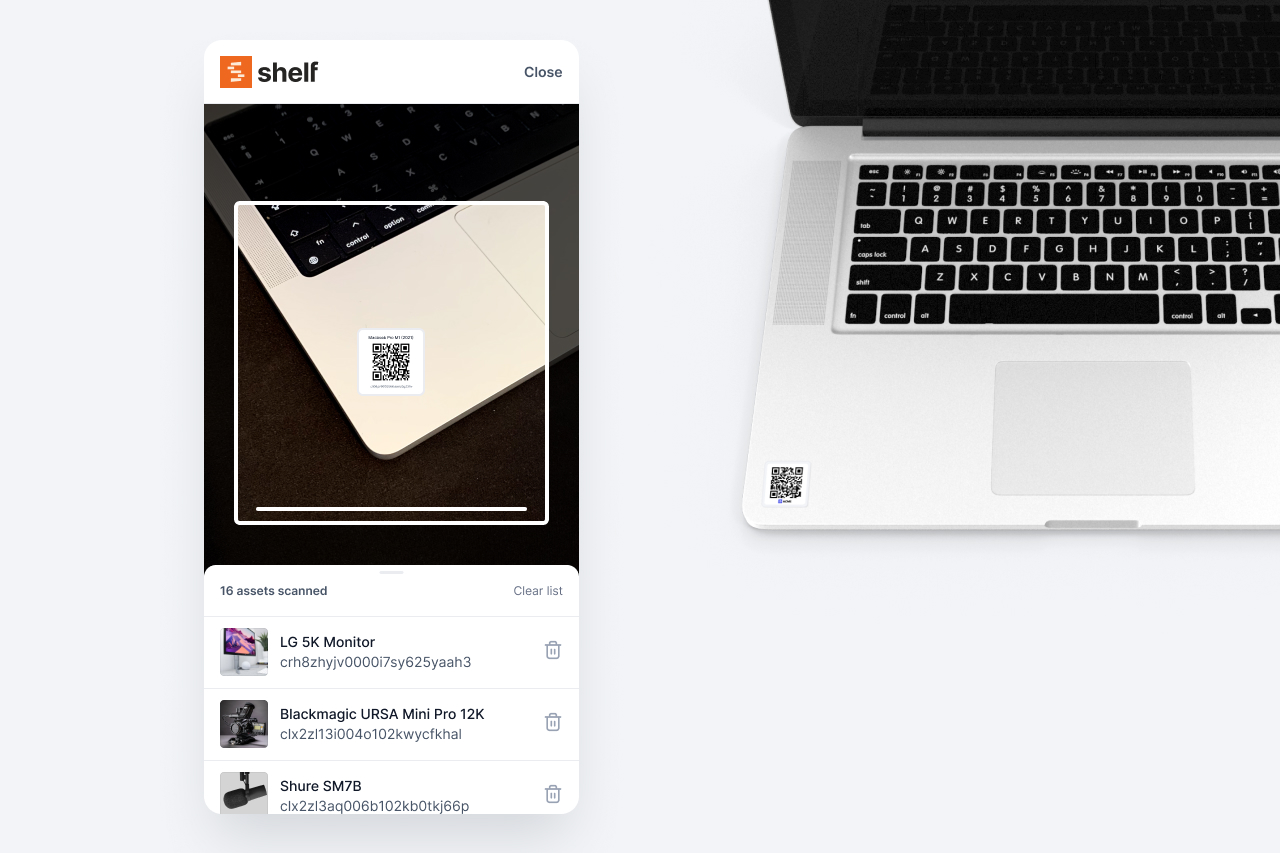
At Shelf, we're constantly innovating to make your asset management experience smoother and more efficient. Our latest feature, QR Scan-to-Add, is designed to streamline the booking process, especially for asset managers working on-the-go.
Key Features:
- Mobile-Friendly Scanning: Use your tablet or smartphone to quickly scan asset QR codes and add them to bookings.
- Desktop Compatibility: Warehouse managers can use desktop scanners for a seamless experience.
- Real-Time Updates: Our system instantly shows asset statuses and potential booking conflicts.
- Duplicate Prevention: Automatically prevents adding the same asset twice to a booking.
- User-Friendly Notifications: Clear, concise alerts guide you through the scanning process.
How It Works:
- Open a draft booking on your device.
- Click the new scan icon to activate your camera.
- Scan the QR code of each asset you want to add.
- Review the list of added assets, with instant feedback on availability and conflicts.
- Finalize your booking with confidence.
This feature is perfect for scenarios where you're preparing assets for transport or need to quickly assemble a list of items for a project. It's especially useful when dealing with multiple identical items, as the QR code ensures you're adding the exact asset you intend to book.
By combining the speed of QR scanning with the thoroughness of our booking system, we're making it easier than ever to manage your assets efficiently and accurately. Try out QR Scan-to-Add today and experience the future of asset booking!
Ready to organize your assets?
Join thousands of teams who trust Shelf to manage their physical assets. Free forever, or try the Team plan free for 7 days.
Out in the field? Shelf Companion is free on iPhone & Android.
More from the blog
Asset Panda Pricing in 2026: Plans, Minimums and What It Really Costs
Asset Panda no longer lists prices on its website. Here is every figure we could source and date: its last public price list, third-party reports, seat minimums, extra users, onboarding, and worked totals for three real team shapes.
Asset Register Template (Excel) and Equipment Inventory List
A free fixed asset register template in Excel with straight-line depreciation formulas, plus an equipment inventory list in Excel and CSV that imports into Shelf. What a register must contain, how to fill it in a day, and when a spreadsheet stops being enough.

Asset Tags: Types, Materials, Numbering and Placement
What an asset tag is and what it must carry, tag types and materials compared, a numbering format with check digits, where to put tags on laptops, cameras, tripods, tools, chairs and vehicles, and what government property tags require.