

The Workspace Backup Export Is Retired
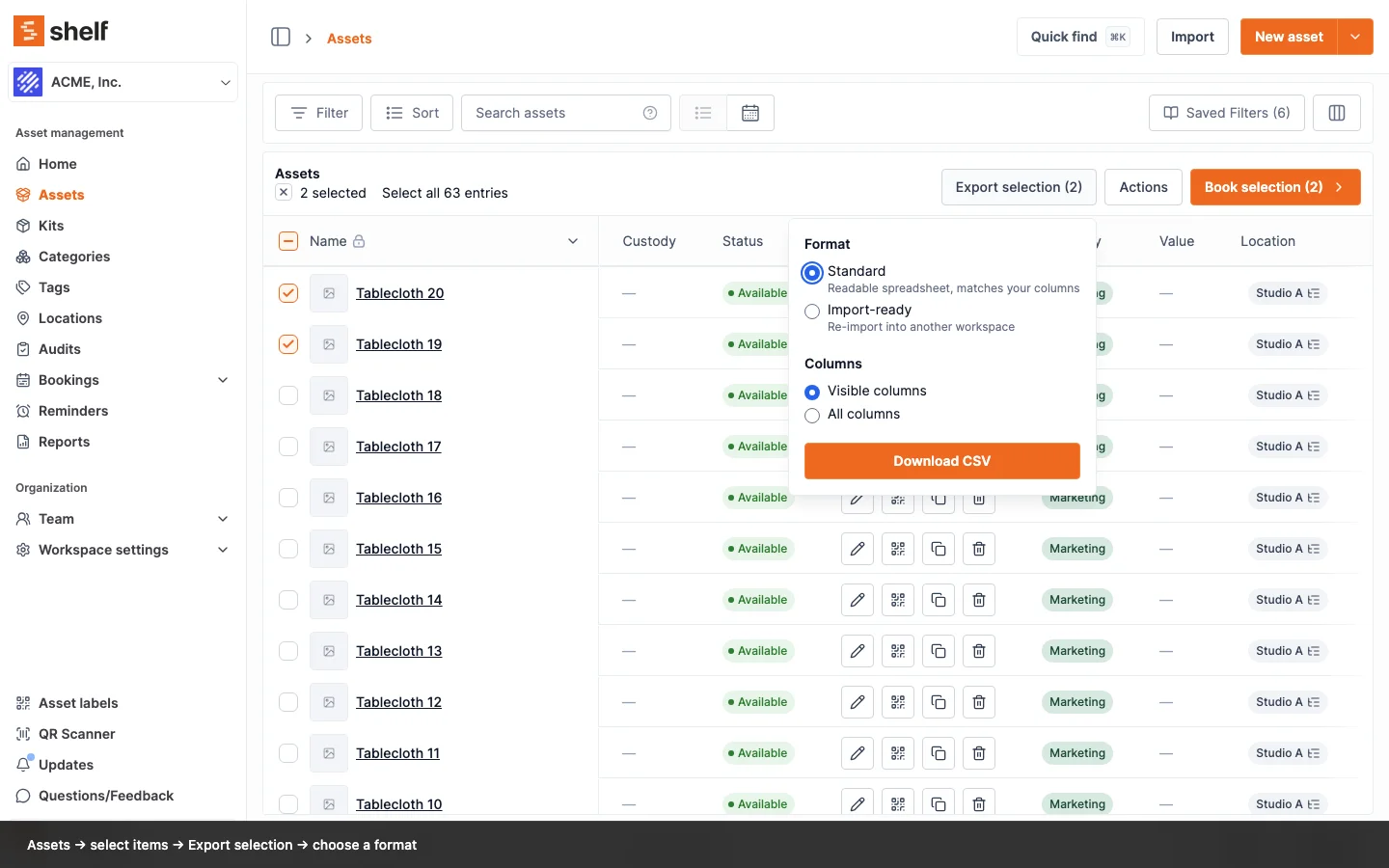
The Asset backup card under Settings → General is gone. The Assets index export does everything it did: select all, Export selection, Import-ready with All columns, and the file re-imports into any workspace.
The Asset backup card under Settings → General, with its Download CSV button, has been removed, and so has the restore tool Shelf support used on those files. The backup format was older than the Assets index export and could not be re-imported by you: its category, tag and asset model cells held raw stored data rather than names.
The Assets index export now covers everything the backup did. Select all assets, click Export selection, choose Import-ready and All columns, and the file carries every asset with its category, tags, location, custodian, asset model, barcodes and custom field values, written the way the importer reads them. Keep it as your copy, or upload it into another workspace through Assets → Import to recreate the assets there.
Old backup files you still have cannot be uploaded: the import page says to use the template or an Import-ready export, and the Update existing flow recognizes a legacy backup file and stops with an explanation. Export again from the Assets index instead.
Ready to organize your assets?
Join thousands of teams who trust Shelf to manage their physical assets. Free forever, or try the Team plan free for 7 days.
Out in the field? Shelf Companion is free on iPhone & Android.