

Every Asset and Kit Has a Scan History
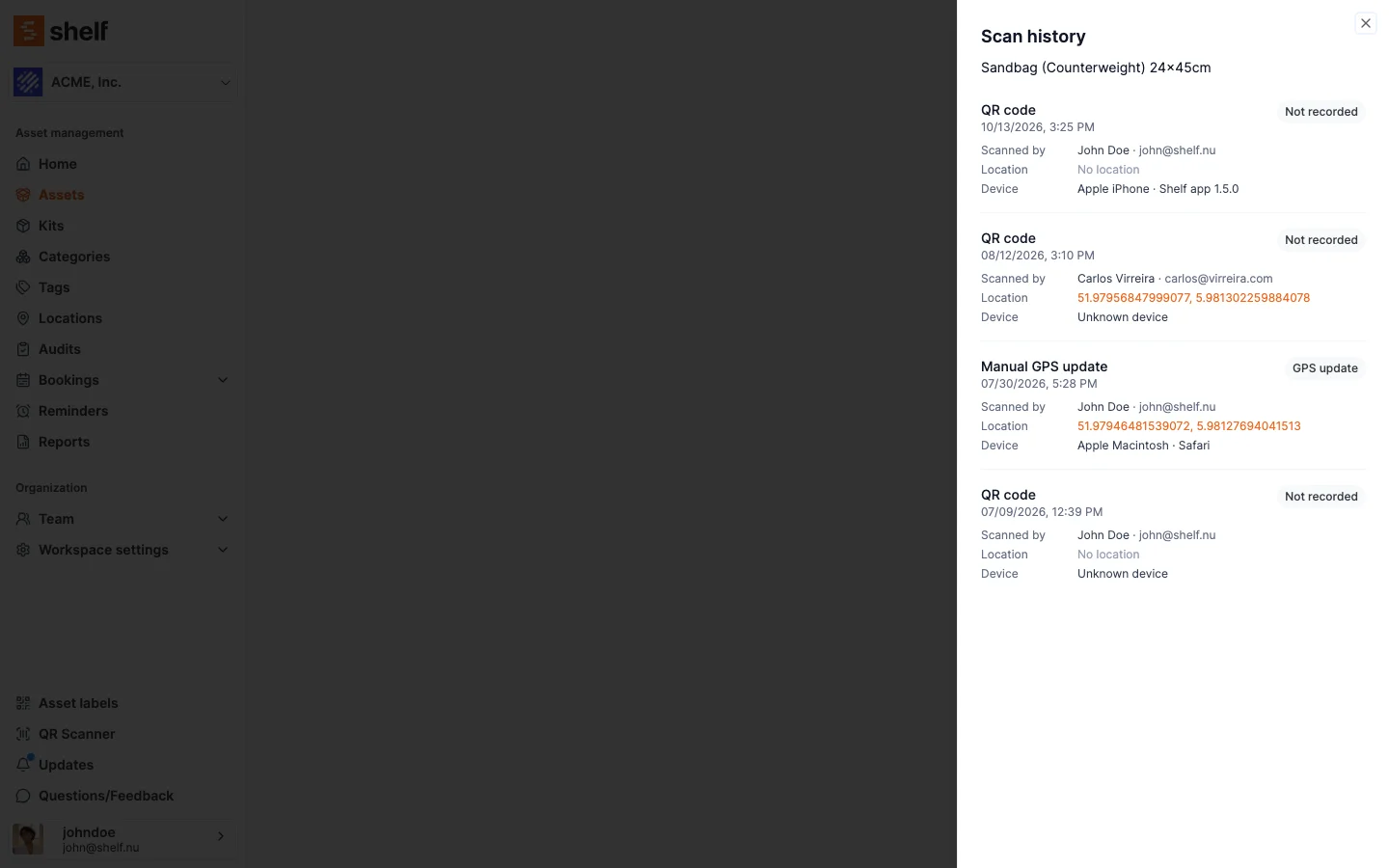
View all scans, under the Last scan card on an asset or kit, opens the full list of its scans, newest first: what was scanned, where it was recorded, when, by whom, the device, and the location when the scan carried one.
Every scan of an asset or kit is recorded, whatever code was on the label and wherever the scan happened. The Last scan card shows the newest one, and under it a View all scans button that opens a panel with the asset's or kit's whole scan history, newest first, 25 at a time with Load more. Each scan says what was scanned (QR code, Barcode with its value, or SAM ID with the ID), where it was recorded (QR link, Web scanner, Scanner list, Companion app, Audit or GPS update; scans from before 16 October read Not recorded), when, who scanned it, the device, and the coordinates as a Google Maps link when the scan carried a location (a scan without one reads No location; web barcode and SAM ID scans carry none). The card's own Source row uses the same words.
The history is visible to the same people as the card: Owners, Administrators and Managers. Self-service and Base users do not see either.
Ready to organize your assets?
Join thousands of teams who trust Shelf to manage their physical assets. Free forever, or try the Team plan free for 7 days.
Out in the field? Shelf Companion is free on iPhone & Android.