

Print a Check-in Receipt for a Booking
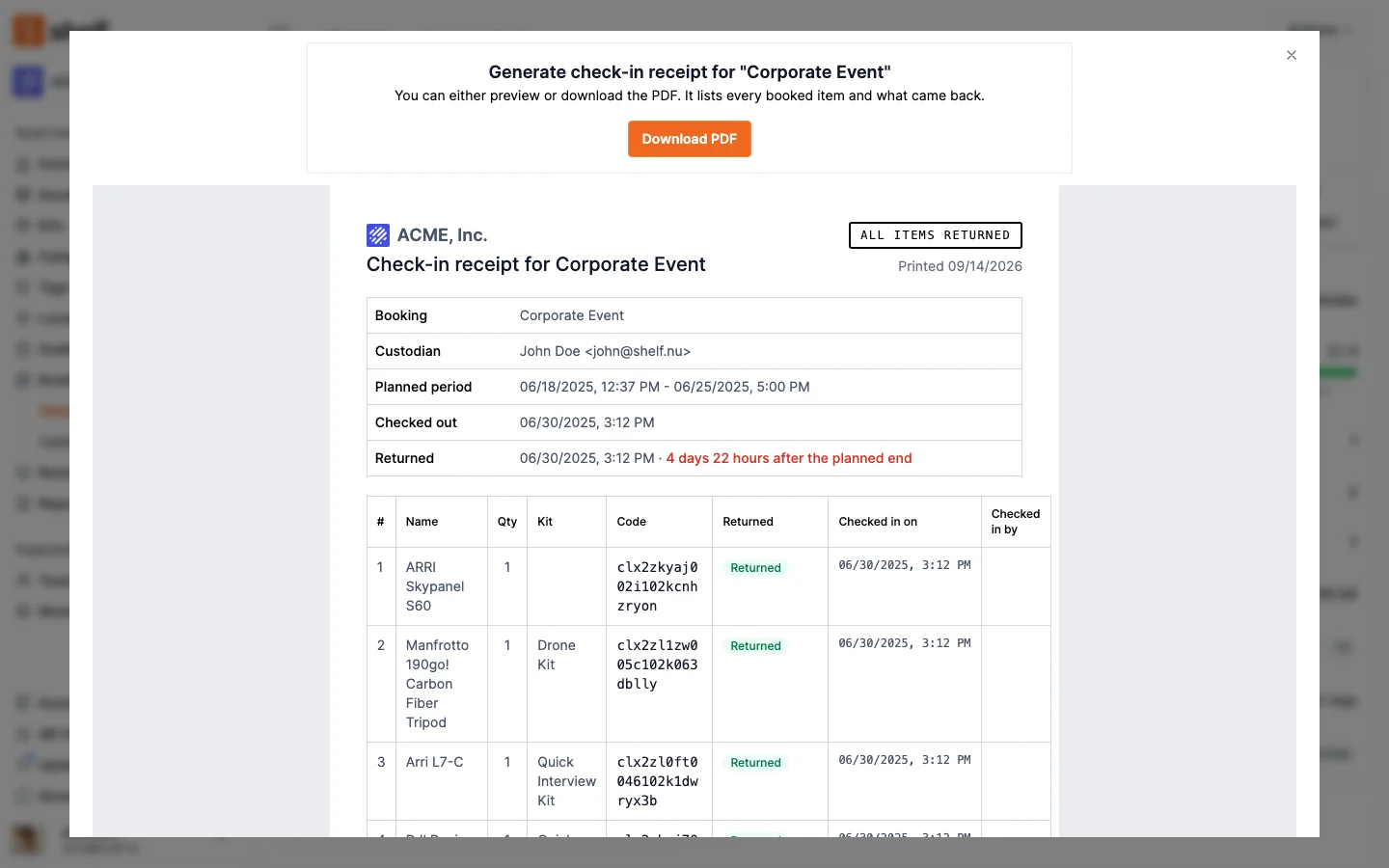
A booking's Actions menu now prints a check-in receipt: what came back, when, and who received it, with a totals ledger and signature lines for the hand-back.
Until now the only PDF a booking had was the checklist, and it reads the same before and after the gear comes back. It is a list of what to pack, not a record of what was returned.
Open a booking and choose Actions → Generate check-in receipt. The receipt states, for every booked item, whether it was Returned, is Still out, or was Never checked out, when it was checked in and who received it. For quantity-tracked stock it splits the units into returned, consumed, lost, damaged and still out. A stamp at the top sums it up, such as All items returned or Partial return · 3 still out, and the booking's planned period, return time and lateness sit above the table. Signature lines at the foot cover the hand-back.
You do not have to wait for the booking to finish: once anything has come back, the receipt can be printed. It carries no asset values, so it can go to a custodian or a client. Owners and Administrators can print it for any booking, and Self-service and Base users for bookings where they are the custodian.
Ready to organize your assets?
Join thousands of teams who trust Shelf to manage their physical assets. Free forever, or try the Team plan free for 7 days.
Out in the field? Shelf Companion is free on iPhone & Android.