

Booking Approval: Reservation Requests That Wait for a Yes
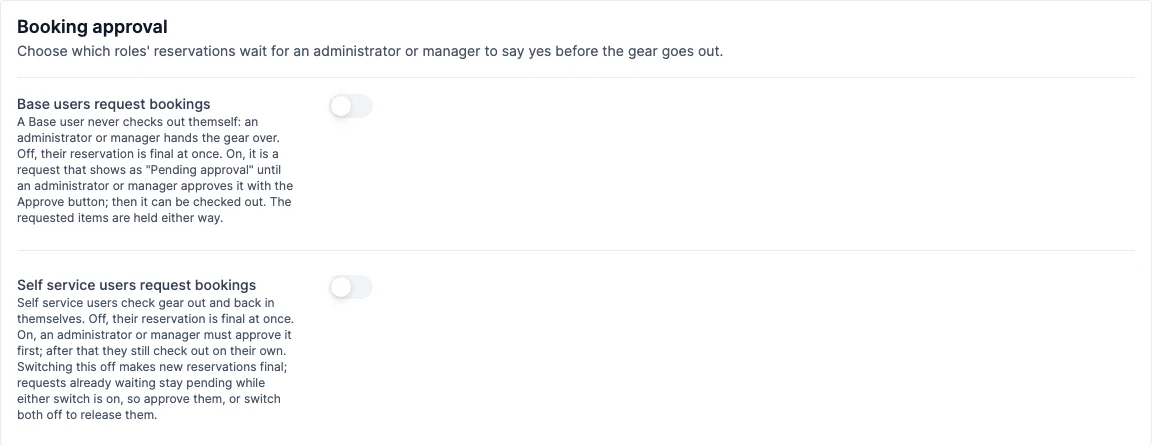
A workspace can now require approval before a reservation goes out. Open Workspace settings, choose Bookings and find the Booking approval card: one switch for Base users, one for Self service users. A request holds its items, shows Pending approval, and is approved by an Owner, Administrator or Manager with the Approve button on the booking.
Equipment rooms that lend to students, volunteers or occasional borrowers can now put a recorded decision in front of every loan. With booking approval on for a role, Base or Self-service, a reservation by someone in that role is a request: the items are held for the dates, the booking shows Pending approval, and it goes out only after an Owner, Administrator or Manager approves it.
Open Workspace settings, choose Bookings, and find the Booking approval card. There is one switch per requesting role, Base users request bookings and Self service users request bookings, so you decide which group needs a yes. Both are off until you switch them on.
How a request moves:
- The requester presses Request reservation and gets an email that the request was received. The gear is held for them while it waits.
- Approvers see a count of waiting requests on View Bookings in the sidebar, can filter the bookings list by Pending approval, and approve with the Approve button on the booking in the web app. Shelf records who approved and when.
- The custodian gets an email as soon as the request is approved. Self-service users then check out on their own; a Base user's booking is handed over by an Administrator or Manager.
- To ask for changes, choose Revert to Draft and add a reason. It reaches the requester by email, and they can change the booking and submit it again.
Reservations made by Owners, Administrators and Managers are approved in the same step, so staff are never slowed down. Booking approval is part of bookings on the Team plan.
Ready to organize your assets?
Join thousands of teams who trust Shelf to manage their physical assets. Free forever, or try the Team plan free for 7 days.
Out in the field? Shelf Companion is free on iPhone & Android.