

A Reservation Sent Back to Draft Now Says So
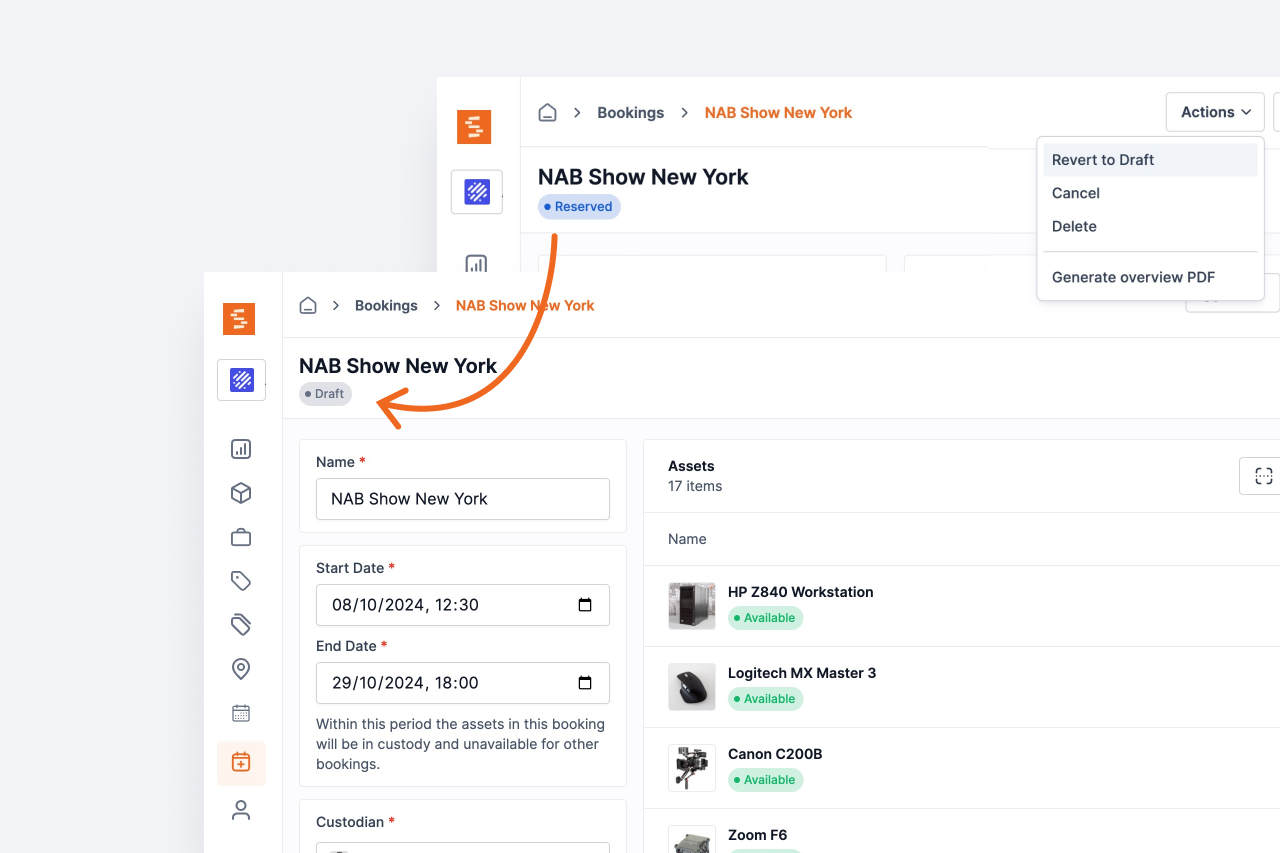
Reverting a reserved booking to draft was the one lifecycle transition that emailed nobody. The custodian is now told, with the same recipient rules as every other booking event.
Revert to Draft is how a reservation request is handed back for changes rather than refused: the booking is not cancelled and nothing on it is lost, it just becomes editable again so dates, items or the custodian can be adjusted and the booking reserved a second time.
Until now it told nobody. A Base or Self-service user pressed Request reservation, an administrator sent the booking back, and the requester learned about it the next time they happened to open the booking. Every other transition already emailed — reserved, cancelled, checked in, extended, deleted — and this was the one gap in the set.
What changed
Reverting a reserved booking now sends the same fan-out as the rest of the lifecycle. The subject reads "↩️ Booking reverted to draft" with the booking's name, and the body says the recipient can review the booking, make changes and submit it again.
Who receives it follows the rules already in Settings → Bookings: the custodian always, the booking's creator while Notify booking creator is on, everyone on the always-notify list, and anyone added as a recipient on that booking. The all-admins broadcast is not part of it — that one is the signal that a new request needs attention, and this event is the answer to a request rather than a new one.
If the email cannot be sent, the revert still stands. The booking's status is written first, so a mail problem leaves you with a booking that is back in draft, not a transition that half happened.
Ready to organize your assets?
Join thousands of teams who trust Shelf to manage their physical assets. Free forever, or try the Team plan free for 7 days.
Out in the field? Shelf Companion is free on iPhone & Android.