

Product Update
Sort, Rename and Merge Dropdown Options
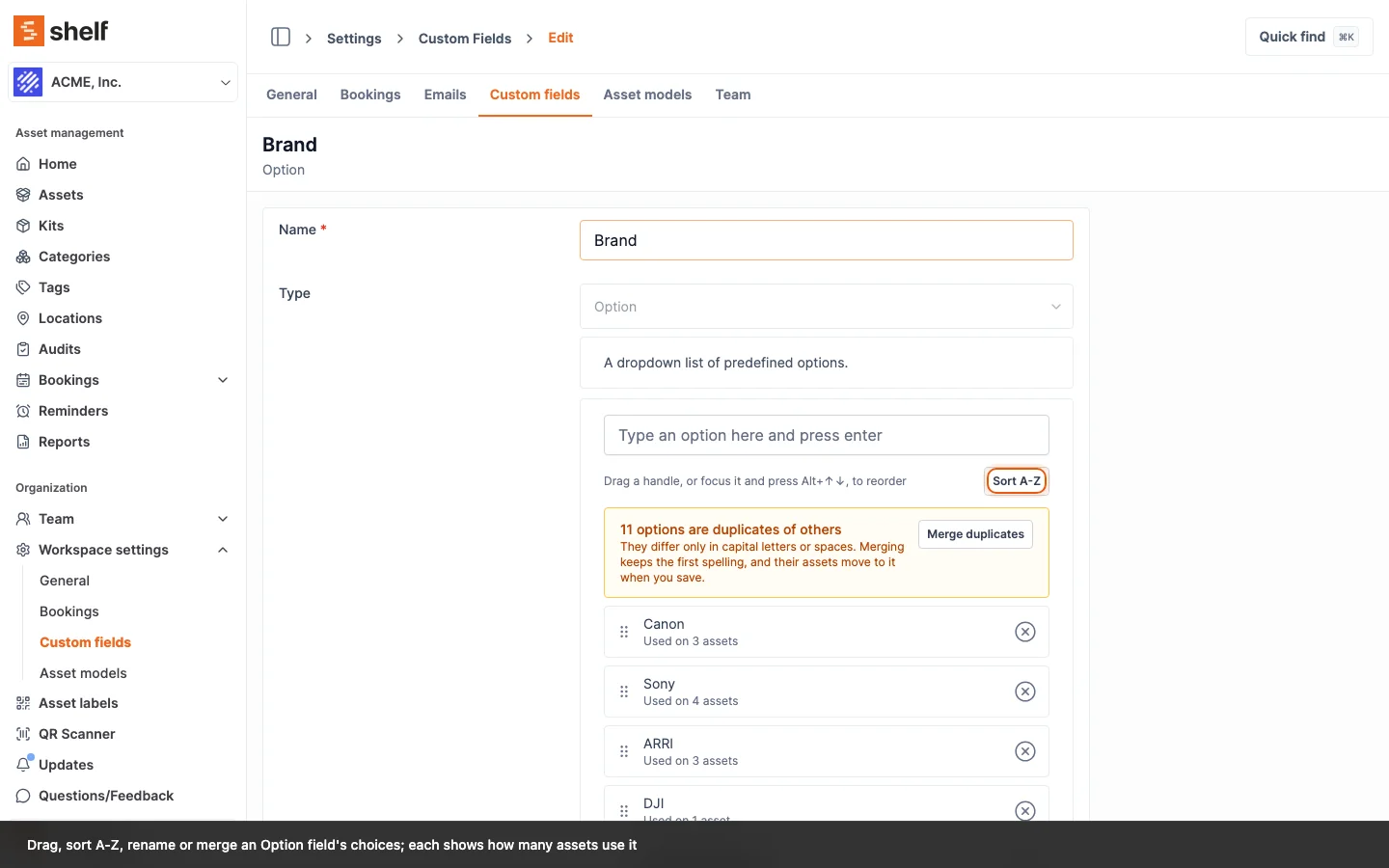
Option custom fields can now be reordered by drag, sorted A-Z, renamed in place and cleared of duplicates, and every asset follows the change when you save.
Under Settings → Custom fields, an Option field's choices can now be managed in place:
- Drag to reorder, or press Alt+Up / Alt+Down, and Sort A-Z in one click, with Undo sort.
- Rename an option, and every asset holding it moves to the new spelling when you save.
- Merge duplicates that differ only in capitals or spaces (
Sony,sony), keeping the first spelling. - Each option that is in use shows Used on N assets, and removing one that is in use asks you to confirm first.
Long dropdowns also get a search box above eight options, in the advanced index filters and in the Shelf Companion app.
Ready to organize your assets?
Join thousands of teams who trust Shelf to manage their physical assets. Free forever, or try the Team plan free for 7 days.
Out in the field? Shelf Companion is free on iPhone & Android.